The Comprehensive Guide to the Best Snipping Tools for Windows and Mac for Enhanced Visual Communication

In an increasingly digital professional landscape, the ability to capture, annotate, and disseminate visual information with precision has become a fundamental skill for creators, educators, and corporate professionals alike. While photographers dedicate years to mastering the aesthetics of high-end portraiture and landscape composition, the humble screenshot remains one of the most frequently utilized, yet often overlooked, instruments for technical communication. Whether drafting a complex software tutorial, developing instructional PDFs, or preparing high-stakes boardroom presentations, the integration of clear, annotated visuals significantly reduces cognitive load and improves clarity. As software ecosystems evolve, the standard operating system utilities are increasingly supplemented by third-party solutions that offer advanced functionality, including optical character recognition (OCR), cloud synchronization, and collaborative workflow management.

The Evolution of Screen Capture Technology
The history of the screenshot dates back to the early days of graphical user interfaces (GUIs). In the 1980s, capturing a screen state was a cumbersome process, often requiring specialized hardware or complex command-line prompts. As operating systems matured, Microsoft and Apple began embedding native utilities into their platforms to democratize this capability.
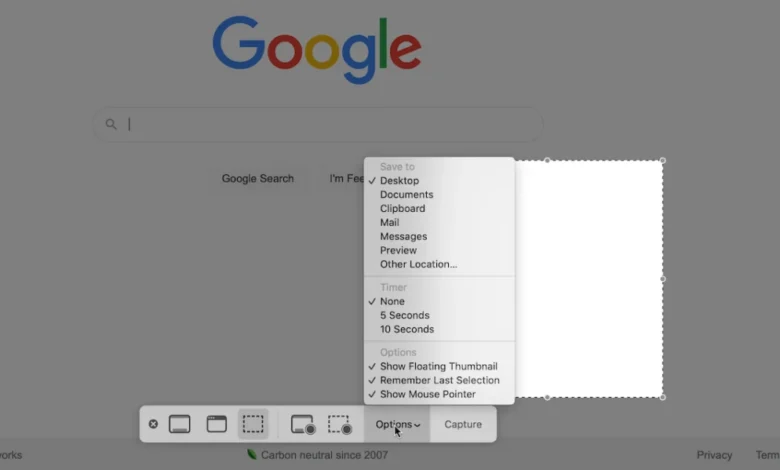
For Windows users, the progression from the "Print Screen" button—which historically copied the entire frame to the clipboard—to the sophisticated "Snip & Sketch" tool marks a significant shift in user experience. Similarly, macOS has transitioned from simple command-key triggers to the robust "Shift-Command-5" utility, which provides a granular interface for selecting specific windows, regions, or time-delayed recordings. Despite these advancements, industry experts note that the demand for "power-user" features—such as scrolling captures, automated text extraction, and enterprise-grade security—has necessitated a robust market for dedicated third-party software.

Native Operating System Capabilities
Modern operating systems provide sufficient functionality for the casual user. Windows 10 and 11 offer the "Snipping Tool" and its successor, "Snip & Sketch," which allow for rectangular, free-form, and full-screen captures. By pressing the Windows key + Shift + S, users can bypass the start menu, a feature designed to minimize the time between identifying a visual point of interest and capturing it.
On the macOS side, Apple’s integrated utility is widely regarded for its versatility. The Shift-Command-5 shortcut serves as a central hub, offering users control over recording parameters, including timer delays for capturing drop-down menus or transient UI elements. These tools are natively integrated, ensuring no additional software bloat and immediate compatibility with system-level security protocols. However, these tools often lack the advanced organizational features required by high-volume users, such as automated naming conventions, cloud-based project folders, or sophisticated image-editing layers.

Analysis of Leading Third-Party Alternatives
When native tools fail to meet specific professional requirements, the market offers a diverse array of specialized applications. Each serves a unique niche, balancing ease of use with technical capability.
Snagit: The Professional Standard
Developed by TechSmith, Snagit is widely recognized as the industry benchmark for professional screen capture. Beyond basic snapshots, Snagit’s "Grab Text" feature allows users to extract editable text directly from an image, a massive boon for those working with non-selectable interface elements. Its recent iterations have prioritized workflow efficiency, introducing pre-made templates for creating technical documentation and native support for creating GIFs, which are increasingly replacing short-form video in corporate communication. While it carries a licensing cost, the value proposition lies in its long-term support and comprehensive feature set.

Greenshot: The Open-Source Contender
Greenshot provides a compelling alternative for those seeking a lightweight, open-source solution. Available for both Windows and Mac, its appeal lies in its portability and unobtrusive nature. Because it is community-developed, it is frequently cited by software developers and IT professionals as an ideal tool for rapid bug reporting. Its ability to capture entire scrolling web pages is a critical feature that native tools have struggled to implement consistently across various browsers.
Lightshot and the Rise of Cloud-Integrated Tools
Lightshot has carved out a market share by prioritizing speed. By replacing the system’s default "Print Screen" functionality, it allows users to capture and upload an image to a private cloud link in under three seconds. Its "similar image" search capability is a unique differentiator, allowing users to cross-reference images with web-based databases, a useful function for identifying the source of an image or locating duplicates within a large archive.

Gemoo Snap and Collaborative Workflow
Gemoo Snap represents the newer wave of "screenshot-as-a-service" tools. It focuses heavily on the feedback loop, offering features like "Pin Screenshot," which allows users to keep a captured image floating over their current window as a reference while they work in a different application. This minimizes the need to toggle between windows, a common pain point for designers and developers. Its integration of OCR and annotation tools—such as arrows, blur, and numbered steps—positions it as an essential tool for remote teams providing asynchronous feedback.
Monosnap and Security-First Design
For organizations operating in high-security environments, Monosnap offers a robust solution. It emphasizes secure data transfer and encrypted cloud storage, addressing the concerns of enterprise IT departments that might otherwise restrict the use of cloud-based screenshot tools. By enabling short video and GIF creation during meetings, it serves as a documentation tool that ensures critical points are captured, stored, and accessible to authorized team members.

ShareX and PicPick: The Power User’s Toolkit
ShareX is frequently described as the most feature-rich free application on the market. It supports a vast array of upload destinations and automation tasks, making it a favorite among power users who prefer to script their workflows. Similarly, PicPick functions as an all-in-one graphic design suite for the desktop, including a color picker, pixel ruler, and protractor. These tools move beyond simple "snipping" into the realm of lightweight design and measurement utilities.
Implications for Corporate Communication and Productivity
The proliferation of these tools has had a measurable impact on workplace efficiency. Research into digital communication indicates that visual-first documentation reduces the time required for onboarding new employees and clarifies complex technical instructions. The shift from "explaining" to "showing" has become a cornerstone of agile project management.

However, the widespread use of third-party screenshot tools also introduces security considerations. Organizations must evaluate whether a tool uploads data to public servers or private clouds. Tools that store data in the cloud, such as Monosnap or ScreenRec, provide convenience but require IT oversight to ensure compliance with data privacy regulations like GDPR or HIPAA. For firms dealing with sensitive proprietary information, local-only tools like Greenshot or specifically configured versions of Snagit are often preferred.
Conclusion
The "best" snipping tool is subjective, depending entirely on the user’s specific workflow requirements. The casual user will find the native Windows or Mac utilities perfectly adequate for basic tasks. For those whose daily responsibilities involve constant visual communication, documentation, or technical support, the investment in a third-party tool like Snagit or the adoption of an open-source solution like Greenshot can yield significant productivity gains.

As visual media continues to dominate professional communication channels, the mastery of these capture tools is no longer an optional skill. By selecting the right software, professionals can ensure that their technical documentation is not only accurate but also visually intuitive, ultimately leading to clearer communication and more efficient project outcomes. The transition from basic screenshots to sophisticated, annotated visual aids represents a broader shift toward a more efficient, visually-driven professional culture.