Integrating a smartphone with a vehicle’s infotainment system has become one of the most widespread and cost-effective ways to modernize a driving experience without requiring expensive hardware upgrades. Android Auto, introduced by Google in 2015, serves as this bridge, transforming a vehicle’s dashboard display into a safer, simplified extension of an Android device running version 9.0 or later. While millions of motorists rely daily on the platform’s native suite of applications—such as Google Maps, Waze, Spotify, and hands-free communication tools—the open-source nature of the Android ecosystem allows power users to unlock deeper functionality far beyond the boundaries of the official Google Play Store.
For automotive enthusiasts and tech-savvy drivers willing to explore alternative methods, sideloading applications offers a gateway to enhanced versatility. Although Google maintains strict guidelines regarding applications permitted on the platform for driver safety, third-party developers have engineered workarounds that bring expanded media streaming, full-screen mirroring, and web browsing directly to the dashboard. Understanding how to safely configure these features requires navigating developer settings, utilizing specialized installation hubs, and evaluating the implications of modifying an automotive operating system.
The Evolution of Android Auto and the Sideloading Landscape
Since its debut at the Google I/O developer conference nearly a decade ago, Android Auto has evolved from a wired projection protocol into a sophisticated, wireless-capable platform integrated directly into millions of modern vehicles. Designed primarily to reduce driver distraction by projecting essential navigation, media, and communication apps onto a centralized console, the software adheres to strict design templates and safety protocols mandated by automotive safety regulators and tech giants alike.
However, the rigid parameters of the official Google Play Store leave several consumer demands unmet, particularly for use cases that occur while a vehicle is stationary. While Apple’s CarPlay framework and Google’s native ecosystem have gradually expanded to include broader categories of applications, users often find themselves restricted when trying to access alternative video platforms or web browsing utilities. This regulatory vacuum has fostered a robust underground developer community dedicated to bypassing official limitations through sideloading—the process of installing applications via APK (Android Package Kit) files rather than official storefronts.
Preparing the Environment: Enabling Developer Settings and Unknown Sources
Before any unauthorized third-party application can interact with a vehicle’s dashboard display, the host smartphone must be configured to permit installations from untrusted sources and unlock hidden diagnostic menus within the Android Auto application framework. This process requires a specific sequence of user inputs designed to prevent accidental modifications by everyday consumers.
To initiate the procedure, a user must navigate to the device settings, select "Apps," locate "Android Auto" within the comprehensive list of installed software, and access "Additional settings." Within this submenu, locating the "Version and permission info" header and tapping it precisely ten times unlocks the hidden developer mode. Once unlocked, accessing the overflow menu in the top-right corner reveals "Developer settings," where the "Unknown sources" toggle must be explicitly enabled. Depending on the specific manufacturer interface—whether Samsung’s One UI, Google’s Pixel UI, or Motorola’s software—exact menu nomenclature may vary slightly, though the underlying architecture remains consistent across Android 9.0 and later iterations.
Android Auto Apps Downloader (AAAD): The Gateway for Third-Party Utilities
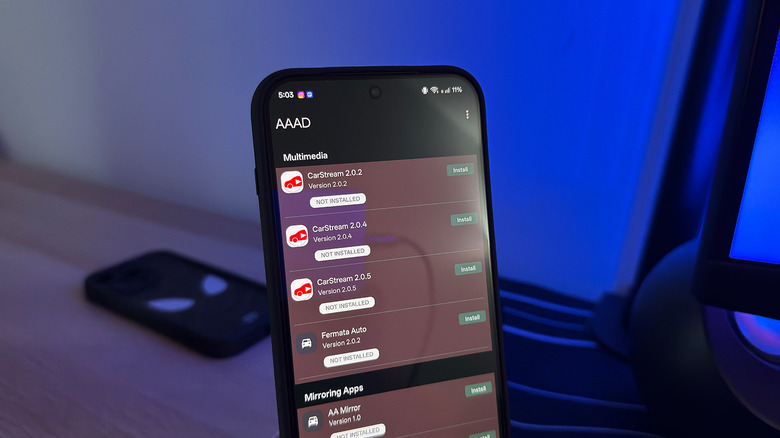
Managing sideloaded applications manually can introduce compatibility hurdles and stability issues, prompting developers to create centralized management tools. Chief among these is the Android Auto Apps Downloader, commonly abbreviated as AAAD. Functioning as an independent package manager designed specifically for automotive projection, AAAD simplifies the discovery, downloading, and installation of third-party utilities that would otherwise require complex manual ADB (Android Debug Bridge) commands.
The utility is distributed directly through developer repositories on GitHub. Users must download the official AAAD APK file, grant the host browser permission to install unknown applications, and complete the installation on their mobile device. Upon launching AAAD, the software requests standard system permissions before presenting a curated catalog of specialized dashboard applications.
While the platform is accessible to all users, the free tier imposes a strict limitation, restricting downloads to a single application every thirty days. To remove this frequency cap and unlock immediate access to the full repository, developers offer a one-time lifetime activation fee priced at approximately €3.99 (roughly $4.65 USD). This monetization model supports ongoing maintenance and ensures compatibility as Google frequently updates the underlying Android Auto API architecture.
CarStream: Bringing YouTube to the Dashboard
Among the most sought-after utilities available through third-party repositories is CarStream, an application engineered to bridge the gap in video consumption on automotive displays. Despite Android Auto’s long-standing presence in the consumer market, official support for streaming video platforms remains limited. While Google has signaled eventual integration for services like YouTube, official release timelines remain scarce, leaving a noticeable feature gap compared to competitor frameworks that accommodate parked-state entertainment.
CarStream effectively resolves this limitation by allowing users to stream YouTube content directly through the vehicle’s infotainment screen. Once configured and connected via USB or wireless projection, CarStream appears as an available application on the dashboard interface. Operating the software mirrors the familiar web experience: users can search for video content, manage playback queues, adjust audio levels using physical steering wheel or console volume knobs, and utilize touch controls to navigate libraries.
Compatibility, however, remains subject to rapid software changes. While CarStream maintains stable performance on legacy operating systems stretching back to Android 9.0, recent updates introduced in Android 15 have effectively blocked the application’s core functionality due to heightened security measures implemented by Google regarding third-party projection apps.
Screen2Auto and AABrowser: Advanced Mirroring and Web Connectivity
For users requiring capabilities beyond standard media playback, applications such as Screen2Auto and AABrowser offer advanced alternatives that maximize the potential of an automotive display.
Screen2Auto functions as a comprehensive screen-mirroring utility, operating similarly to CarStream but with vastly expanded parameters. Rather than restricting the user to a single video platform, Screen2Auto mirrors the entire user interface of the host smartphone onto the car’s infotainment screen. This capability allows motorists to run virtually any installed mobile application on their dashboard display. The software includes intelligent orientation detection, automatically shifting mobile interfaces into landscape mode to ensure a natural interaction model on wide-format automotive screens. For individuals struggling with compatibility issues in CarStream, Screen2Auto serves as a robust, highly customizable substitute.
Complementing screen mirroring is AABrowser, a dedicated web navigation tool designed specifically for automotive integration. AABrowser embeds a functional web browser directly into the vehicle’s interface, allowing users to surf the internet, check news portals, or access web-based services without needing to handle a mobile device. To streamline text input, the application features dual-control functionality, enabling users to type URLs via the connected smartphone or utilize an on-screen keyboard rendered directly on the car’s touchscreen display. Similar to CarStream, AABrowser’s availability is deeply tied to mobile OS iterations, with newer versions explicitly requiring Android 15 or later to function correctly.
Safety Implications, Legal Considerations, and Industry Outlook
The expansion of sideloaded applications into the automotive space introduces critical conversations surrounding driver safety, regulatory compliance, and cybersecurity. Motoring authorities worldwide—including the National Highway Traffic Safety Administration (NHTSA) in the United States and equivalent European bodies—maintain strict guidelines regarding driver distraction. Interactive elements such as web browsing, video streaming, and full-screen mirroring present significant cognitive, visual, and manual distractions that drastically increase the risk of collisions if operated while a vehicle is in motion.
Developers and digital consumer advocates consistently emphasize that applications like CarStream, Screen2Auto, and AABrowser are engineered strictly for stationary use cases. Typical scenarios include utilizing infotainment screens while a vehicle is parked at an electric vehicle charging station, waiting in a stationary queue, or resting during long-distance transit. Nevertheless, the technical capability to bypass safety lockouts creates enforcement challenges, as the software itself cannot inherently verify whether a vehicle is parked or moving unless integrated directly into the vehicle’s CAN bus (Controller Area Network) diagnostic systems—a level of integration typically reserved for native OEM software.
From a cybersecurity perspective, sideloading applications inherently circumvents the sandboxing and vetting procedures enforced by official app marketplaces. Installing third-party APKs from external repositories exposes mobile devices to potential security vulnerabilities, malware propagation, and unauthorized data harvesting. Users opting to modify their Android Auto environments must weigh these digital security risks against the functional benefits provided by unverified software.
As automotive software ecosystems continue to mature, the tension between closed, highly regulated manufacturer environments and open-source consumer customization will likely persist. Google and automotive manufacturers are continuously hardening operating system architectures to close security loopholes and restrict unauthorized app execution, as evidenced by recent compatibility blocks introduced in modern Android iterations. Whether official platforms will eventually incorporate comprehensive entertainment and web-browsing capabilities under standardized safety frameworks remains to be seen, but until then, sideloading remains the primary avenue for power users seeking to maximize their vehicle’s technological potential.