How to Eliminate Aliasing and Over-Sharpening in Action Camera Footage Using After Effects

The rapid proliferation of compact action cameras, aerial drones, and smartphones has fundamentally transformed modern videography, empowering creators to capture high-definition perspectives previously deemed impossible. However, this democratization of video production has introduced specific technical hurdles that challenge even seasoned editors in post-production. Among the most persistent and visually distracting anomalies is aliasing—a form of digital distortion that frequently plagues footage shot on smaller sensors. To address this issue efficiently, editors have traditionally relied on blunt-force methods like global blurring. Today, however, specialized post-production workflows utilizing targeted algorithms—such as the free FXAA plugin for Adobe After Effects—offer a sophisticated solution to restore visual fidelity without sacrificing crucial fine details.
Understanding the Mechanics of Video Aliasing
Aliasing in digital video manifests as jagged, stair-stepped lines, shimmering edges, or chaotic moiré patterns on high-frequency details such as textiles, architecture, and rippling water. This visual artifact is rooted in a fundamental sampling error. When a camera sensor lacks the physical resolution or pixel real estate to accurately resolve high-frequency visual information, the digital sampling process fails.

The physics of action cameras inherently exacerbates this problem. Due to their ultra-compact form factors, devices manufactured by industry leaders like GoPro, DJI, and Insta360 must utilize diminutive image sensors. While these tiny sensors are remarkable feats of engineering capable of capturing stunning 4K or even 8K resolution, their densely packed pixels are exceptionally vulnerable to spatial aliasing.
Compounding the hardware limitation is the software tuning embedded within most consumer-grade action cameras. Manufacturers routinely apply aggressive in-camera sharpening algorithms by default. This aggressive digital enhancement is designed to make footage appear immediately crisp and striking on small mobile screens. Unfortunately, when transferred to high-resolution editing monitors and large displays, this over-sharpening hardens pixel boundaries, turning latent aliasing into glaring, flickering distractions that can instantly ruin an otherwise professional take. Furthermore, heavy video compression codecs used to manage high-framerate action footage often interact destructively with these sharp edges, intensifying compression artifacts and making the final output look gritty and unpolished.
The Evolution of Post-Production Mitigation Strategies
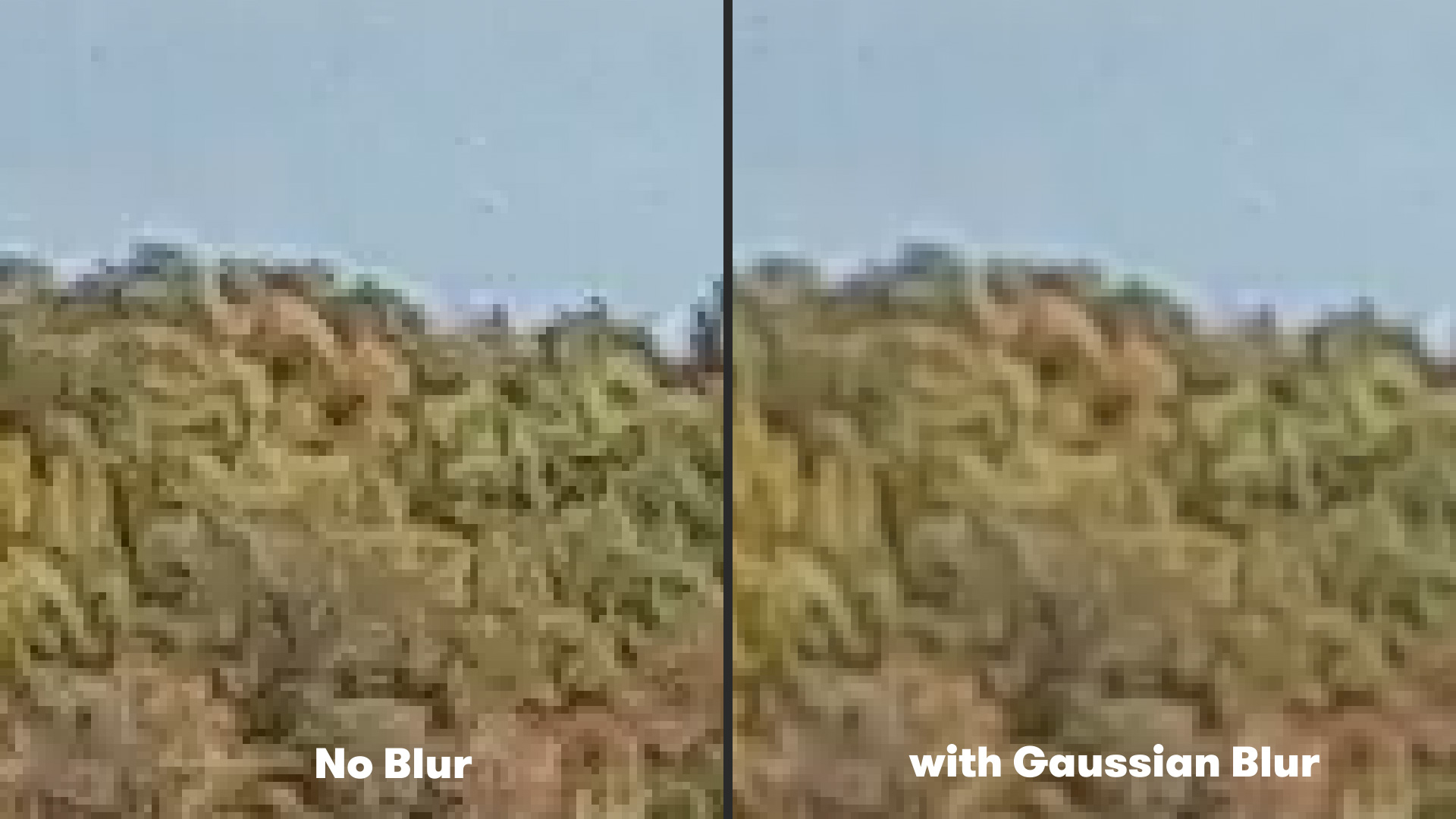
For years, video editors working with over-sharpened or aliased action camera files had limited options in post-production. The standard industry workaround involved applying a subtle Gaussian blur across the entire video layer. By softening the high-contrast edges slightly, editors could successfully diminish the flickering and stair-stepping caused by aliasing.
While functional, the Gaussian blur method carried a significant workflow penalty. Because a standard blur is indiscriminate, it softens every single pixel in the frame. Consequently, intricate textures, distant foliage, fine lines, and subtle gradations that did not suffer from aliasing were inadvertently degraded, resulting in a soft, muddy aesthetic that undermined the crispness of high-definition recordings. Editors were forced to compromise, choosing between distracting aliasing flicker or an overall loss of image sharpness.
The introduction of edge-aware filtering tools has fundamentally shifted this paradigm. Rather than applying a uniform blur, modern anti-aliasing plugins analyze pixel luminosity and color gradients across the frame, applying targeted softening exclusively to jagged boundaries.
Implementing the FXAA Workflow in Adobe After Effects
Among the most efficient tools developed for this specific purpose is FXAA (Fast Approximate Anti-Aliasing), a free plugin created by Plugin Everything for Adobe After Effects. Originally derived from real-time rendering techniques heavily utilized in the video game industry, FXAA is specifically engineered to detect jagged edges and smooth them out with minimal computational overhead.
The implementation process within After Effects is streamlined for maximum efficiency in fast-paced editing environments. After importing the affected action camera footage into an active composition, an editor simply navigates to the Effects menu, selects the Plugin Everything directory, and applies the FXAA effect. The plugin immediately analyzes the pixel matrix, deploying an edge-detection algorithm that identifies high-contrast boundaries prone to aliasing and gently interpolates the pixels to create a smooth, natural transition.
One of the primary advantages of the FXAA workflow is its rendering speed. Because the algorithm relies on intelligent edge detection rather than heavy, pixel-by-pixel mathematical blurring, it renders exceptionally fast. This performance efficiency allows creators to maintain a fluid playback and preview experience, which is vital when working with resource-heavy 4K or high-framerate action footage.
Furthermore, the plugin’s modular design offers scalability. In scenarios involving extreme over-sharpening or severe sensor aliasing from budget action cameras, editors are not restricted to a single instance of the effect. By stacking multiple instances of FXAA within the After Effects Effect Controls panel, users can incrementally increase the anti-aliasing strength, tailoring the mitigation precisely to the severity of the source material without globally compromising the integrity of the wider shot.
Broader Implications for High-Action and Adventure Videography
The ongoing evolution of post-production correction tools highlights a broader shift in the digital media landscape. As consumer hardware becomes increasingly powerful—pushing higher frame rates, wider dynamic ranges, and higher resolutions into smaller bodies—the burden of image optimization increasingly shifts from the capture device to the editing suite.
For adventure filmmakers, sports documentarians, and travel vloggers who rely heavily on helmet mounts, drone sweeps, and chest harnesses, managing artifacts like aliasing and motion jitter is a routine operational challenge. Beyond anti-aliasing solutions, workflows addressing motion stability—such as dedicated stabilization applications like ReelSteady GO—have become standard components of the modern post-production pipeline.
By combining targeted edge-detection anti-aliasing plugins like FXAA with advanced stabilization and color grading, creators can bridge the gap between consumer-grade hardware limitations and broadcast-quality visual standards. As software developers continue to refine machine learning and algorithmic filtering, the future of action videography looks increasingly sharp, stable, and visually pristine—ensuring that the thrilling perspectives captured by extreme sports cameras are matched by uncompromising cinematic execution.
Related posts: