Sonic Republic Launches Pluginize! to Streamline macOS Plugin Management and Workflow Efficiency

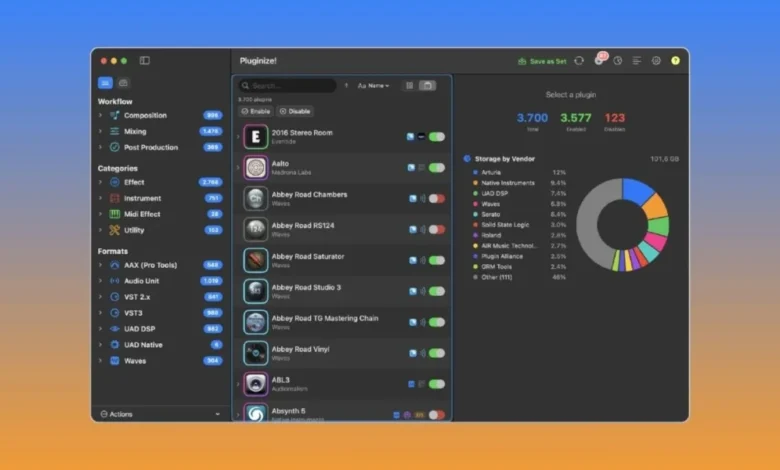
Sonic Republic has officially announced the release of Pluginize!, a dedicated native macOS utility designed to address the increasing complexity of digital audio plugin management for professional music producers and sound engineers. As the digital audio workstation (DAW) ecosystem has expanded over the last two decades, the volume of virtual instruments and effects processors utilized by creators has grown exponentially, often leading to significant system instability and workflow bottlenecks. Pluginize! enters the market as a specialized solution to these logistical challenges, offering a centralized interface for organizing, enabling, and disabling plugins across various formats without requiring the uninstallation of software.
The Evolution of Plugin Management and the Problem of Bloat
In the early days of digital recording, a producer might have owned a handful of essential VST or AU plugins. However, the contemporary landscape is characterized by "plugin bloat." It is not uncommon for a professional studio to house thousands of plugins, many of which are part of massive bundles from vendors such as Waves, Universal Audio (UAD), and FabFilter. This abundance creates several technical hurdles. First, DAW scan times increase dramatically as the software must verify the license and integrity of every installed file upon startup. Second, many vendors install their entire catalog regardless of whether a user owns the specific licenses, leading to cluttered menus where users must sift through hundreds of inactive tools to find the one they need.
Pluginize! was developed specifically to mitigate these issues. By providing a non-destructive management layer, the application allows users to hide plugins from their DAW’s view. This is achieved by moving the plugin files to a designated "(Unused)" folder within the system’s library. Because the files are not deleted, the process is entirely reversible, ensuring that system integrity is maintained while the DAW’s plugin list remains lean and focused.
Technical Capabilities and Cross-Format Integration
Pluginize! offers comprehensive support for the industry’s most prevalent formats, including Audio Units (AU), VST2, VST3, AAX, and the newer CLAP (Clever Audio Plugin) format. One of the most significant technical hurdles in plugin management is the redundancy of formats. A single plugin is often installed as an AU, a VST3, and an AAX version to ensure compatibility across different DAWs like Logic Pro, Ableton Live, and Pro Tools.
The software introduces "cross-format awareness," a feature that recognizes when different file extensions represent the same product. Instead of displaying three separate entries for a single compressor, Pluginize! treats them as a unified entity. This allows a producer to enable or disable the "family" of formats with a single click, though the option remains to manage individual formats if a specific troubleshooting scenario arises.
Advanced Handling of Waves and Universal Audio Ecosystems
Perhaps the most notable innovation within Pluginize! is its granular approach to Waves and Universal Audio (UAD) plugins. Historically, these two vendors have been notoriously difficult to manage. Waves utilizes a "WaveShell" system, where a single component file acts as a bridge for hundreds of individual plugins. Standard plugin managers often struggle with this architecture, usually only allowing the user to enable or disable the entire Waves folder.
Sonic Republic claims that Pluginize! can interface with these bundles at the individual plugin level. This means a user can hide a specific Waves limiter or a UAD preamp that they do not own or use, without affecting the rest of the installation. Furthermore, the application includes an auto-restore feature. When a vendor issues an update—a process that often resets plugin folders and "breaks" manual organization—Pluginize! detects the change and automatically reapplies the user’s preferred configuration. This prevents the common frustration of having to re-clean a plugin library every time a software update is performed.
Workflow Customization Through Plugin Sets
Recognizing that different stages of production require different tools, Pluginize! includes a "Plugin Sets" feature. This allows users to save and switch between various active plugin configurations.
For instance, a "Tracking Set" might only include low-latency preamps and compressors to ensure smooth recording sessions. A "Mixing Set" could enable the full suite of creative effects and heavy processors, while a "Mastering Set" focuses on high-fidelity linear phase EQs and limiters. Additionally, for producers who travel, a "Mobile Set" can be configured to include only plugins that do not require physical iLok dongles or high-bandwidth internet connections. This switching capability effectively allows a user to "rebuild" their plugin folder in seconds to suit the task at hand, significantly reducing the cognitive load during the creative process.
Visual Organization and the Plugin Catalog
Beyond mere file management, Pluginize! serves as a visual database for a producer’s toolkit. The software includes a "Plugin Catalog" that features icons and interface previews for over 40 smart subcategories. Many producers find that they recognize their tools by their visual interface faster than by their name, especially when dealing with vintage emulations.
The interface also provides "update badges" and storage breakdowns, giving users a clear view of how much disk space their plugin library is consuming. This transparency is particularly valuable for users working on laptops with limited internal SSD storage, as it identifies large, unused libraries that could potentially be offloaded.
Chronology of Development and Release
The development of Pluginize! was driven by practical necessity rather than market speculation. The project was initiated by Michele Brunazzi, the founder of Sonic Republic and a veteran producer. Brunazzi noted that as his personal library grew into the thousands, the time spent managing files began to eclipse the time spent on actual music production.
- Early Development Phase: The tool began as a series of scripts designed to handle the specific complexities of the Waves and UAD ecosystems on macOS.
- Beta Testing: Throughout late 2023 and early 2024, the tool underwent testing within professional studio environments to ensure that the "moving-to-unused" method did not interfere with macOS system permissions or DAW stability.
- Official Launch: The software was officially released to the public, with version 1.2 being the current stable build. This version includes Apple Developer ID signing and notarization, ensuring it meets Apple’s stringent security standards for third-party software.
- Future Roadmap: Sonic Republic has indicated that while the current focus is on macOS 14 Sonoma and later, they are actively monitoring the development of new plugin formats and macOS updates to ensure continued compatibility.
Official Responses and Market Context
While major DAW developers like Apple (Logic Pro) and Steinberg (Cubase) include basic plugin managers within their software, these built-in tools are often limited. They can "validate" or "ignore" plugins, but they do not remove them from the DAW’s scanning path, meaning the underlying system overhead remains.
Industry analysts suggest that third-party utilities like Pluginize! are becoming essential as the "subscription model" for plugins becomes more common. With services like Roland Cloud or Slate Digital, users often have hundreds of plugins installed that they may only use occasionally.
"The goal was never to replace the DAW’s internal scanner, but to curate what the DAW is allowed to see in the first place," stated Michele Brunazzi during the product’s rollout. "By the time your DAW starts to open, the heavy lifting of organization should already be done. Pluginize! is that gatekeeper."
Data and System Requirements
For professional environments, stability is the primary concern. Pluginize! is built as a Universal Binary, meaning it runs natively on both Intel-based Macs and the newer Apple Silicon (M1, M2, M3) chips.
Key Technical Specifications:
- OS Requirement: macOS 14 Sonoma or later.
- Licensing: €69.99 for a perpetual license.
- Activations: Two Mac activations per license.
- Safety Feature: The application includes a "DAW-Open" detection system that prevents the moving of plugin files while a digital audio workstation is active, preventing potential system crashes or data loss.
Broader Impact and Industry Implications
The release of Pluginize! highlights a growing trend in the "Pro Audio" sector: the move toward workflow optimization tools over new sound-generating software. As the market reaches a saturation point for EQs and compressors, the value proposition for many professionals has shifted toward efficiency.
The ability to manage the CLAP format is also significant. As an open-source alternative to VST and AU, CLAP is gaining traction for its better multi-core performance and non-destructive automation. By including CLAP in its management suite, Pluginize! positions itself as a forward-looking tool ready for the next generation of audio technology.
Furthermore, the environmental and economic impact of "digital clutter" is a rising concern. Large plugin folders not only slow down computers—leading to shorter hardware lifespans—but also contribute to "decision fatigue" among creators. By providing a method to declutter the workspace, Sonic Republic is addressing the psychological aspect of modern music production, potentially leading to faster project completion times and higher creative output for its users.
In conclusion, Pluginize! represents a sophisticated response to the "more is more" era of music software. By focusing on the administrative side of the studio, Sonic Republic provides a utility that serves the needs of high-end professionals and hobbyists alike, ensuring that the technology serves the creator rather than the other way around. The €69.99 investment is positioned as a "productivity tax" that pays for itself in saved time and reduced technical frustration.
Related posts: