Streamlining After Effects Color Grading with the New Auto Levels Script

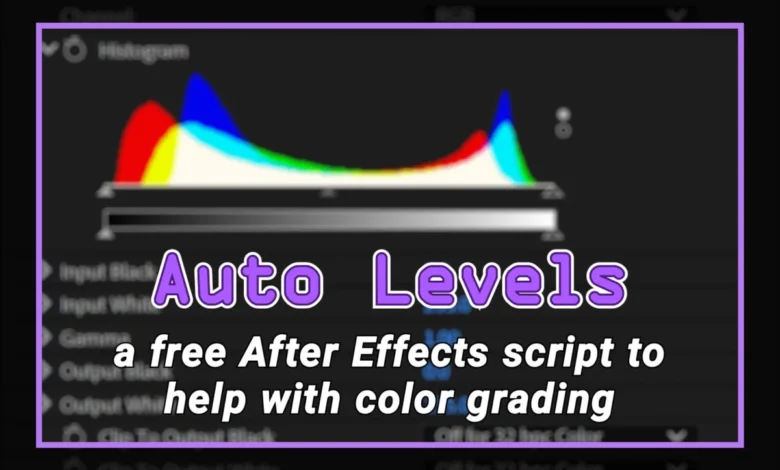
The post-production landscape in motion graphics and visual effects is defined by the constant pursuit of technical efficiency. As project turnarounds accelerate, the ability to automate repetitive, foundational tasks becomes a competitive necessity for freelancers and studios alike. To address the persistent challenges associated with standard color correction workflows in Adobe After Effects, a new, free-to-use script titled Auto Levels has been introduced, offering a more stable and transparent alternative to the native Auto Levels plugin. This tool, developed to provide precise control over black and white point clipping, aims to resolve common issues such as temporal flickering and opaque data processing that have long hindered the standard plugin’s reliability.
The Technical Challenges of Automated Color Correction
Color grading is a cornerstone of professional video production, acting as both a corrective measure to restore image fidelity and a creative tool to establish mood and aesthetic consistency. A standard industry practice involves normalizing footage by identifying the minimum (black) and maximum (white) pixel values across the red, green, and blue (RGB) channels. By pinning these extremes, editors ensure that the dynamic range of a clip is fully utilized, providing a clean foundation for subsequent creative treatments.
However, the native Auto Levels plugin included in After Effects often fails to meet professional standards for consistent, high-end output. The primary limitation of the native tool is its frame-by-frame analysis architecture. In practice, this means the plugin recalculates the black and white points for every individual frame. While this may seem granular, it introduces a significant risk of temporal instability. If a scene contains subtle lighting shifts, camera movement, or changing subjects, the native plugin will adjust its internal parameters dynamically. This results in an undesirable flickering effect, as the image’s contrast and brightness values fluctuate in ways that do not necessarily match the actual lighting intent of the scene.
While the native plugin offers a "temporal smoothness" setting to mitigate these fluctuations, this comes at a steep cost to system performance. Enabling such processing requires the software to analyze multiple frames simultaneously, significantly increasing render times and putting additional strain on hardware resources. For editors working with 4K or 6K footage, this overhead can be prohibitive.
Development Chronology: From 2018 to Present
The genesis of the new Auto Levels script traces back to 2018, during a period of high-volume live-action production. Facing the constraints of existing tools, the creator sought a more robust, static solution. The development was driven by the necessity for a workflow that would allow for a single, comprehensive analysis of a clip, followed by the application of fixed, transparent values that would remain consistent across the entire duration of the shot.
By integrating the functionality of the "Color Link" plugin—a tool capable of extracting technical metadata from footage—the developer engineered a script that functions by performing a "master analysis." This process scans the entire duration of a clip once to determine the absolute minimum and maximum RGB values. These values are then applied to the standard After Effects "Levels" effect. By offloading the calculation to a one-time script operation, the user gains a static, predictable result that does not require real-time re-analysis during playback or final rendering.
Technical Advantages and Workflow Integration
The implementation of this script offers several distinct advantages over legacy automated tools. The most significant is the shift from a "black box" process to an open, editable framework. Because the script outputs its findings directly into the standard Levels effect, the user is provided with a transparent numerical readout of the black and white points.
This transparency is vital for professional colorists. If the script’s automated calculation needs refinement, the user is not locked into an inflexible plugin setting. Instead, they can manually adjust the gamma, mid-tones, or individual channel values while maintaining the foundational work the script has already performed. This "best of both worlds" approach allows for speed in the initial setup phase while preserving the creative control required for final grading.
Furthermore, because the script converts the analysis into fixed values within the Levels effect, the "flicker" associated with native automated tools is effectively eliminated. Once the values are set, the effect behaves like any other static adjustment, allowing for smooth playback and faster render times, as the CPU no longer needs to compute complex, frame-by-frame color corrections.
Data Analysis and Industry Context
In the context of the broader visual effects (VFX) pipeline, time-saving scripts are increasingly essential. According to recent surveys on creative workflows, professional editors spend approximately 15% to 20% of their total project time on color correction and cleanup tasks. Tools that can reduce this "technical overhead" allow professionals to allocate more time to high-value creative tasks, such as color science, LUT application, and artistic grading.
The use of the Color Link plugin as a foundation for this script highlights the importance of technical data extraction in modern post-production. By utilizing objective data—specifically, the absolute RGB minimums and maximums—the script ensures technical accuracy. This is particularly important for projects involving multiple camera sources or varied lighting conditions. Ensuring that all clips have a consistent, technically sound starting point is a prerequisite for seamless color matching between different shots.
Broader Implications for the After Effects Community
The release of this script serves as a reminder of the role that the independent developer community plays in the Adobe ecosystem. While Adobe provides a robust suite of tools, the modular nature of the software allows for specialized scripts to bridge the gap between "out of the box" functionality and the specific needs of professional pipelines.
By providing a free, open alternative to a native plugin, the project underscores a shift toward more transparent and efficient color correction practices. It encourages a workflow where automation is used as a springboard for, rather than a replacement of, human decision-making.
For freelancers and studios, the adoption of such tools can translate into measurable improvements in project timelines. By removing the tedium of manual leveling and eliminating the performance pitfalls of native temporal analysis, the Auto Levels script enables a more streamlined transition from the edit phase to the final color grade.
Implementation and Support
The script is available for immediate download for users looking to optimize their After Effects workflow. As with any third-party script, it is recommended that users test the integration within their specific project environment, particularly when working with complex nested compositions or high-bit-depth footage.
The developer has encouraged the user community to provide feedback and report any bugs, ensuring that the script remains compatible with future updates to the After Effects environment. This commitment to ongoing maintenance is a standard practice for utility-based scripts, ensuring long-term viability for users who choose to incorporate the tool into their standard template or workflow.
As the industry continues to emphasize both speed and quality, the integration of targeted, efficient scripts like Auto Levels represents a practical approach to modern post-production. By focusing on stability, transparency, and performance, the tool provides a clear example of how technical optimization can enhance the creative potential of the After Effects environment.