Premiere Pro’s Color Mode Adds More Control for Editors Finishing Their Own Work

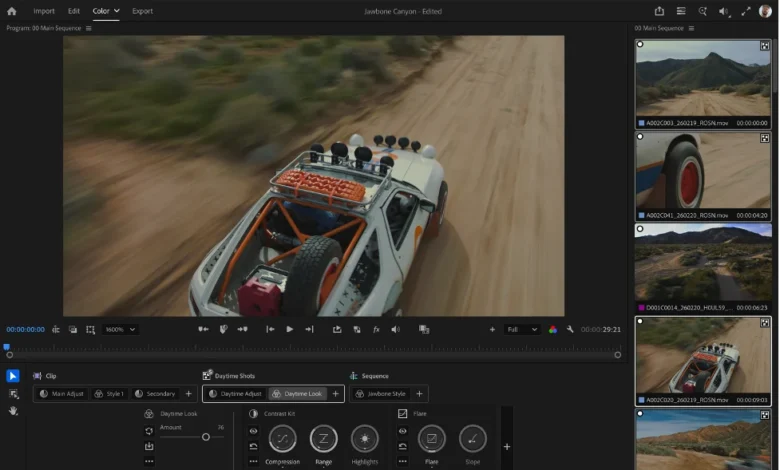
The evolution of modern post-production has shifted the traditional boundaries of the editorial suite. Where color grading was once the exclusive domain of a specialized technician working in a controlled environment, the rise of "all-in-one" post-production workflows has necessitated a change in how editors interact with image fidelity. Adobe has addressed this shift with the ongoing development of its "Color Mode" for Premiere Pro, a feature currently in public beta that aims to streamline the transition from raw edit to final delivery. By moving away from the legacy Lumetri workflow toward a more modular, zone-aware architecture, Adobe is effectively attempting to democratize professional-grade finishing for the solo editor.
The Evolution of the Editorial Workflow
Historically, the editing process followed a linear path: assembly, rough cut, fine cut, and finally, the handoff to a colorist. However, data from industry surveys—including reports from the Post Production World and various creative cloud usage metrics—indicate that over 60% of independent editors now handle their own color correction, sound mixing, and final deliverables. This "finishing editor" archetype faces a unique set of constraints. They must balance the creative pacing of a film with the technical demands of color science, often while managing compressed production timelines.
Adobe’s introduction of Color Mode, which first appeared in beta early in 2024, represents a departure from the "filter-based" approach of the past. The system is designed to handle the complexities of modern footage—log-encoded camera files, mixed-format timelines, and high-dynamic-range (HDR) delivery requirements—without requiring the editor to exit the software or employ a secondary application.
Chronology of the Beta Development
The development of Color Mode has been iterative, marked by significant updates over the past several months:
- Q1 2024: Adobe announces the initial beta of Color Mode, introducing a dedicated grading workspace that separates color operations from traditional clip-based effects.
- Q2 2024: The introduction of "Auto Color" and "Reanalysis" tools, allowing editors to automate the normalization of disparate footage.
- Q3 2024: Refinement of the "Midtones" and "Variable Vibrance" modules, addressing user feedback regarding the limitations of traditional lift, gamma, and gain controls.
- Q4 2024 to Present: Integration of enhanced group management and style-based workflows, allowing for sequence-wide consistency rather than individual clip-by-clip adjustments.
Technical Analysis: Breaking Down the Modules
The core strength of Color Mode lies in its zone-aware processing. Unlike traditional color correction tools that apply global shifts, Color Mode utilizes a more granular approach to image data.
Auto Color and Reanalysis
The "Auto Color" function within the Adjust operation is not intended as a "set it and forget it" solution. Instead, it serves as an intelligent baseline. By analyzing the frame at the playhead, the system makes educated adjustments to exposure and white balance. The introduction of "Reanalysis" is particularly critical here; it allows editors to override the algorithm’s initial choice if the software sampled a non-representative frame (such as a flash of light or a dark transition). This prevents the "drift" often seen in automated processes, where an editor spends more time correcting the automated correction than they would have spent doing the job manually.
Midtones vs. Traditional Gamma
One of the most persistent challenges in digital color grading is the manipulation of midtones without degrading the shadows or highlights. Adobe’s decision to replace traditional gamma controls with a "Midtones" module is a strategic move toward HDR-ready workflows. In wide-gamut projects, traditional gamma tools can often "wash out" images or compress highlights in a way that feels unnatural. By using zone-aware logic, the Midtones module allows editors to adjust skin tones or density in the center of the exposure range while leaving the extreme highlights—where HDR detail lives—untouched.
Variable Vibrance
Saturation management remains a primary pain point for editors dealing with mixed lighting. Traditional saturation controls affect the entire image equally, which can lead to unnatural skin tones when an environment is pushed for aesthetic effect. Variable Vibrance allows for a tiered approach, enabling the editor to increase color depth in the background while selectively protecting the subject. This reduces the need for "secondary" masks and windows, significantly shortening the time spent on shot-by-shot refining.
The Macro View: Sequence-Level Grading
The most profound shift in Color Mode is the movement away from clip-level isolated decisions. In a standard timeline, if an editor decides to adjust the contrast of an interview segment, they must often copy and paste attributes across dozens of clips. If the lighting conditions change midway through the shoot, the editor is forced to manually re-adjust every subsequent clip.
Color Mode’s "Clip Grid" and grouping functionality treat the sequence as a single entity. By grouping clips by scene or location, an editor can apply a stylistic "Style"—a collection of modules—to an entire sequence. If the client requests a "warmer" look, the editor updates the group, and the change cascades through the entire sequence instantly. This modularity turns the color grade into a flexible, living document rather than a rigid, baked-in layer.
Implications for the Industry
The shift toward these integrated tools has significant economic implications for small-to-medium production houses. By reducing the "technical debt" of the finishing process, studios can allocate their budgets toward more creative endeavors rather than basic technical normalization.
However, industry experts note that this does not necessarily signal the end of the professional colorist. While Color Mode is powerful, it is designed for efficiency and broad-stroke consistency. Large-scale cinematic projects, which require complex color science, film print emulation, and collaborative multi-user workflows, will likely continue to rely on dedicated color-grading platforms like DaVinci Resolve or Baselight. The target audience for Adobe’s Color Mode is the "prosumer" and the professional editor working on documentaries, commercials, and corporate content, where time-to-delivery is the primary competitive advantage.
Managing Wide Gamut and Reference White
A critical technical hurdle for any editor is maintaining color integrity when moving between working spaces and output destinations (e.g., grading in Rec. 2020 but delivering in Rec. 709). Adobe has built Color Mode with "Reference White" awareness, a feature that ensures that standard white levels are treated correctly even in high-dynamic-range environments.
For editors, the key takeaway is the necessity of "highlight protection." When working in wide gamut, if the highlight controls are not managed correctly, the image can exhibit "banding" or clipping as it is down-sampled to Rec. 709. Adobe’s documentation emphasizes that in most standard workflows, highlight controls should be pushed to their maximum, allowing the system to intelligently map the wide-gamut data to the narrower display range.
Conclusion: The Future of the Integrated Suite
As software continues to blur the lines between creative editing and technical finishing, tools like Adobe’s Color Mode serve as a harbinger of a more unified workflow. The focus is no longer on providing the most complex tools possible, but on providing the most context-aware tools. By allowing editors to work at the sequence level, utilize reusable styles, and benefit from intelligent, zone-based adjustments, Adobe is positioning Premiere Pro as a comprehensive finishing station.
For the editor, the goal remains unchanged: to tell a compelling story. By automating the technical hurdles that once stood in the way of a polished image, Color Mode allows the creator to focus less on the "how" of color correction and more on the "why," ultimately resulting in a more cohesive and professional final product. While the beta phase continues, the architecture is already clear: the future of professional editing is fast, modular, and, above all, integrated.
Related posts: