Plasticity 2026.1 Brings Technical Drawing Tools and PolySpline Mesh Conversion to the Lightweight NURBS Modeler

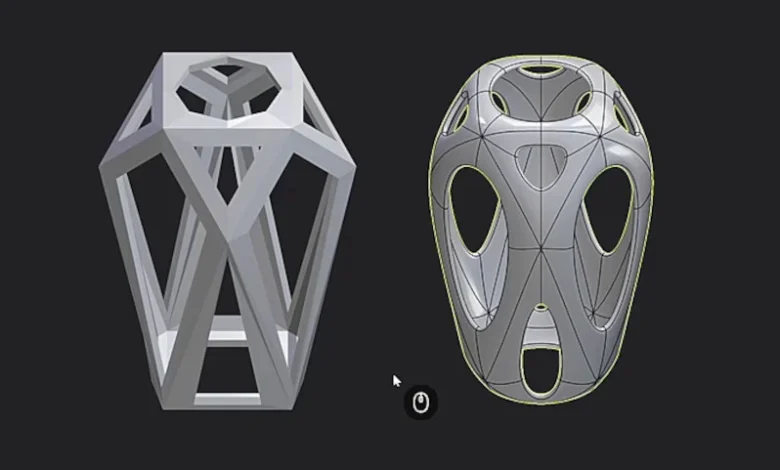
Plastic Software, the development entity led by technologist Nick Kallen, has officially announced the release of Plasticity 2026.1. This latest iteration of the Non-Uniform Rational B-Spline (NURBS) modeling application introduces a suite of features designed to bridge the gap between creative concept art and precise industrial design. Key highlights of the update include a new "Export Hidden Line" command for generating technical illustrations, a dedicated "Slot" command for mechanical detailing, and the introduction of "PolySplines" in the Studio edition—a sophisticated technology aimed at converting polygonal meshes into clean, editable NURBS surfaces with G2 continuity.
Since its initial debut in 2023, Plasticity has carved a unique niche in the computer-aided design (CAD) market. Frequently marketed as "CAD for artists," the software was built to provide a streamlined, lightweight alternative to industry heavyweights like Autodesk Fusion or MoI (Moment of Inspiration). By utilizing the Parasolid kernel—the same robust geometry engine that powers high-end enterprise solutions like SolidWorks and Siemens NX—Plasticity offers professional-grade precision within a user interface that feels familiar to users of polygonal modeling software like Blender.
Advancing Technical Illustration with Export Hidden Line
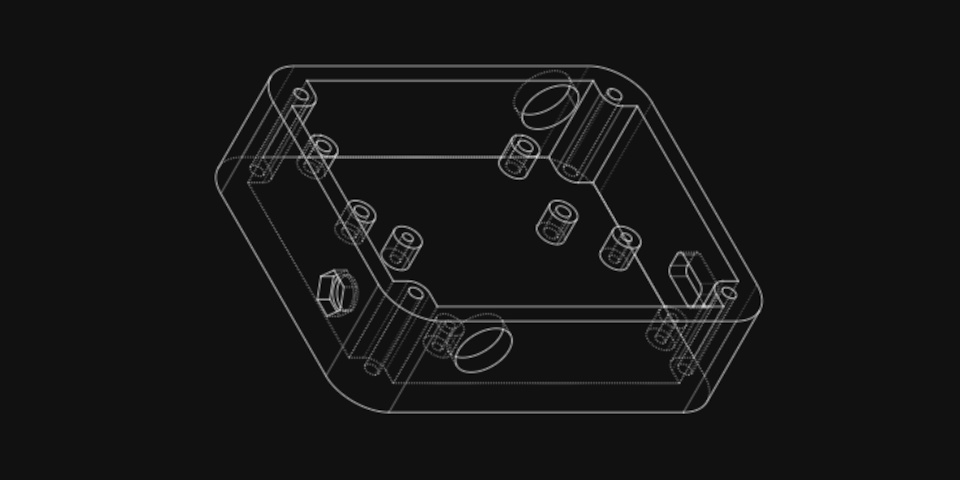
The centerpiece of the 2026.1 update for many industrial designers and technical illustrators is the Export Hidden Line command. This feature addresses a long-standing requirement in the design pipeline: the ability to translate complex 3D geometry into 2D vector drawings for documentation, patent applications, or aesthetic presentation.
Unlike traditional screen captures or standard renders, the Export Hidden Line tool processes the 3D model to identify visible and obscured edges based on the camera’s perspective. It then generates a 2D representation in the Scalable Vector Graphics (SVG) format. The implementation is highly customizable, allowing users to define line weights, colors, and styles. Crucially, it supports hatching patterns and the display of hidden edges (represented by dashed lines), which are essential for technical blueprints. The inclusion of a grid display template further assists in maintaining scale and orientation during the export process, ensuring that the resulting files are ready for further refinement in vector editing software like Adobe Illustrator or Affinity Designer.
The Introduction of PolySplines: A New Era for Mesh-to-NURBS Conversion
For users of the Plasticity Studio edition, the 2026.1 update introduces PolySplines, a command that represents a significant leap in geometry processing. Developed by renowned graphics researcher Jorg Peters, PolySplines is designed to convert polygonal meshes into editable NURBS surfaces. While traditional conversion methods often rely on Catmull-Clark subdivision, which can result in an overwhelming number of small, fragmented patches, PolySplines aims for a "successor technology" approach.
The primary advantage of PolySplines lies in its ability to produce fewer, cleaner patches while maintaining G2 (curvature) continuity. In the world of industrial design, G2 continuity is the gold standard for surface quality, ensuring that reflections across a surface are smooth and devoid of visual artifacts. By allowing artists to take a low-poly cage—perhaps modeled in a traditional polygonal tool—and transform it into a mathematically precise NURBS body, Plasticity is effectively closing the loop between organic digital sculpting and manufacturing-ready CAD geometry. Nick Kallen has noted that this technology is intended to simplify the often-tedious process of "re-topologizing" or manually tracing over meshes to create clean CAD data.
Enhancements to Core Modeling Commands
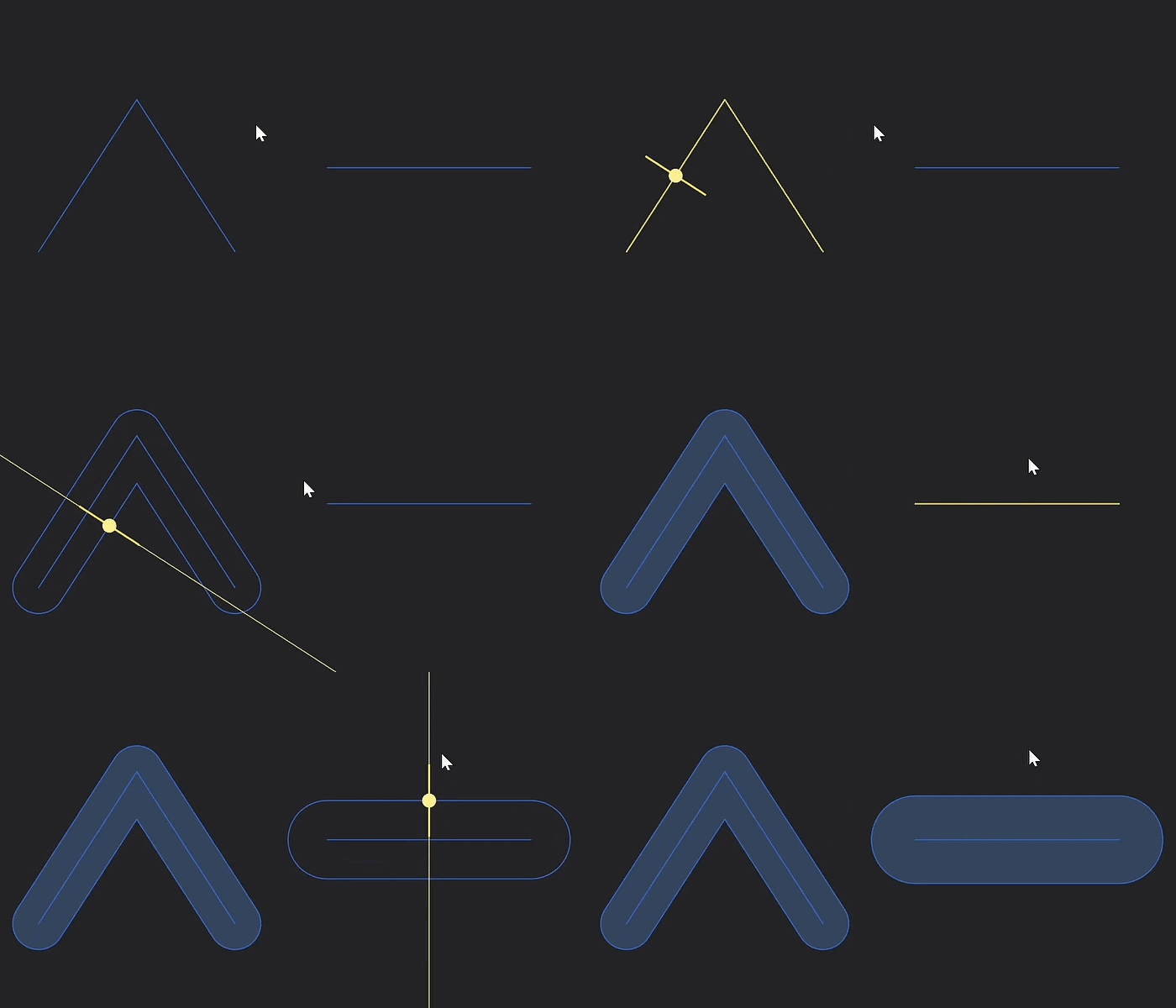
Beyond the headline features, Plasticity 2026.1 includes a comprehensive overhaul of its core toolset. A new Slot command has been added to the sketch menu, which allows users to generate a closed slot shape—commonly used for bolt holes, ventilation ports, and mechanical tracks—by simply offsetting and capping an open curve. This eliminates several manual steps previously required to create these standard industrial features.
Additionally, thirteen existing commands have received significant updates. These include refinements to the way curves are aligned, the precision with which objects can be mirrored or placed in a scene, and the mathematical robustness of extrusion operations. The development team has focused on "quality of life" improvements, such as allowing users to enter precise numerical values directly into gizmo controls for distance and rotation. This shift toward higher numerical precision ensures that the software can meet the rigorous demands of mechanical engineering while retaining its fluid, artist-centric workflow.
Workflow Optimization and Interoperability
As project complexity increases, the ability to manage large numbers of objects becomes critical. Plasticity 2026.1 introduces a search field within the Outliner, enabling users to quickly filter and locate specific bodies or curves in a dense scene hierarchy. Furthermore, the software now preserves material assignments when objects are copied and pasted between different project files, a small but vital change for maintaining consistency in large-scale design tasks.
Interoperability remains a cornerstone of the Plasticity philosophy. The 2026.1 update enhances the export process for OBJ and STL files by providing new controls to override default length units and scaling. This ensures that models exported from Plasticity appear at the correct dimensions when imported into slicer software for 3D printing or into game engines like Unreal Engine and Unity. For artists working in concept design, these improvements reduce the friction associated with moving assets between different stages of the production pipeline.
Historical Context and Market Positioning
The trajectory of Plasticity since its 2023 launch reflects a broader trend in the software industry toward specialized, high-performance tools that reject the "all-in-one" bloat of legacy applications. By focusing specifically on hard-surface modeling, Plasticity has avoided the complexity of simulation, animation, and rendering suites, opting instead to be the best possible tool for geometry creation.
The software’s adoption of Blender-like keybindings was a strategic move that lowered the barrier to entry for a generation of digital artists who found traditional CAD interfaces (like those of Rhino or AutoCAD) to be unintuitive. By 2024, Plasticity had already established itself as a favorite among concept designers in the film and games industries. The 2026.1 release signals a move toward more "serious" industrial applications, providing the documentation tools and advanced surfacing mathematics required for actual product manufacturing.
Analysis of Implications for the Design Industry
The release of Plasticity 2026.1 carries several implications for the broader design landscape. First, the introduction of PolySplines challenges the dominance of traditional subdivision-to-NURBS workflows found in much more expensive software packages. If Plasticity can consistently deliver high-quality G2 surfaces from polygonal inputs at a $299 price point, it may force larger CAD vendors to reconsider their pricing models or innovate more rapidly in their own surfacing toolsets.
Second, the Export Hidden Line feature moves Plasticity into the realm of communication and documentation. For independent designers and small studios, the ability to generate professional-grade technical drawings within the same application used for 3D modeling is a major efficiency gain. It reduces the need for a "middleman" software, thereby lowering the total cost of ownership for a professional design stack.
Pricing, Availability, and System Requirements
Plasticity 2026.1 is available across multiple platforms, supporting Windows 10 and 11, Ubuntu 22.04+ Linux, and macOS 12.0 or later. The software is offered through a transparent, perpetual licensing model, which has been a point of praise from a user base increasingly frustrated by the industry-wide shift toward mandatory subscriptions.
The Indie license, priced at $175, provides a perpetual node-locked license that includes the core modeling features and support for standard file formats such as STEP, STL, OBJ, and Parasolid XT. The Studio license, priced at $299, is geared toward professional environments, offering the aforementioned PolySplines technology and a wider array of proprietary CAD format support. Both tiers reflect the developer’s commitment to providing high-end tools at a fraction of the cost of enterprise CAD solutions.
As Plasticity continues to evolve, the 2026.1 update stands as a testament to the power of a focused, community-driven development approach. By integrating sophisticated mathematical research like PolySplines with practical, artist-requested features like hidden line export, Plastic Software has solidified Plasticity’s reputation as the premier choice for modern hard-surface modeling. The update is now available for download to existing license holders and new users through the official Plasticity website.