Baseus Spacemate RD1 Plus Review: A Comprehensive Analysis of the 14-in-1 Docking Station Ecosystem

For the modern creative professional, the laptop has transitioned from a portable convenience to the primary engine of digital production. Whether it is 4K video editing, complex 3D rendering, or high-fidelity audio production, the reliance on a single mobile device necessitates a robust bridge between the "on-the-go" workflow and the "anchored" desktop environment. The Baseus Spacemate RD1 Plus, a 14-in-1 docking station, attempts to solve the persistent issue of peripheral fragmentation—the endless cycle of connecting and disconnecting cables for displays, storage, and power. By integrating GaN (Gallium Nitride) power technology with high-bandwidth connectivity, this device represents a strategic shift toward consolidating desktop real estate.
The Evolution of the Modern Desktop Hub
Historically, docking stations were bulky, proprietary hardware often tied to specific laptop manufacturers, limiting their utility in mixed-device environments. As the industry moved toward universal standards like USB-C and Thunderbolt, the market saw a surge in dongles. However, these small adapters often failed to manage thermal loads and power delivery simultaneously, leading to connectivity drops and hardware throttling.
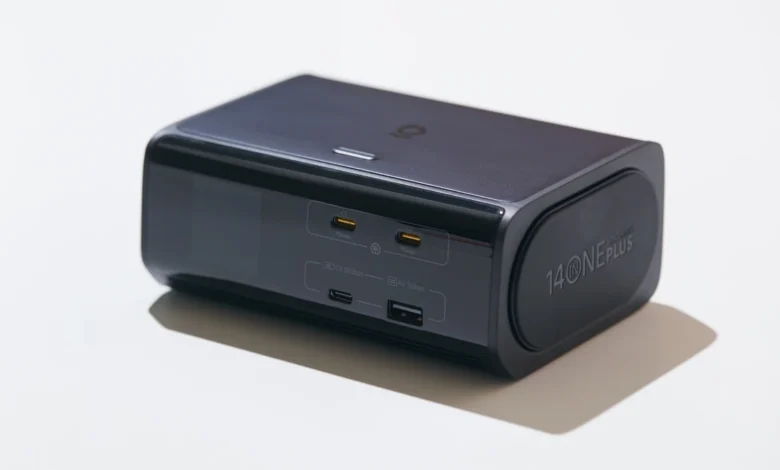
The introduction of the Baseus Spacemate RD1 Plus follows the industry trend of the "vertical tower" form factor. By shifting the footprint from a horizontal, space-consuming rectangle to a vertical orientation, manufacturers are responding to the growing demand for minimalist desk aesthetics in professional studio environments. The RD1 Plus, measuring 3.72" x 0.98" x 5.45" and weighing 1.37 kg, is designed to serve as a fixed infrastructure point, effectively acting as the central nervous system for a desk setup.
Technical Specifications and Connectivity Architecture
The engineering philosophy behind the RD1 Plus centers on high-density port integration. The device features an internal 140W GaN power module, which significantly reduces the need for external power bricks that typically contribute to cable clutter.
The connectivity suite includes:
- Host Connection: A single rear-facing USB-C port delivering 100W Power Delivery (PD).
- Display Output: Dual HDMI ports; HDMI 1 supports up to 4K at 60Hz, while HDMI 2 offers 4K at 120Hz for high-refresh-rate workflows.
- Data Ports: Two 10 Gbps USB-C 3.2 ports and two 5 Gbps USB-A 3.0 ports, alongside legacy USB-A 2.0 support for peripherals.
- Networking and Storage: A Gigabit Ethernet (RJ45) port and SD/microSD 3.0 card readers.
A critical aspect of the device’s design is its intelligent power management system, PowerTune 3.0. This system distributes a total shared pool of 120W, prioritizing the connected host computer while dynamically allocating power to auxiliary ports. This is a vital implementation for creators who use the dock to charge tablets, camera batteries, or smartphones simultaneously while maintaining a stable connection to their primary workstation.
Thermal Management and Structural Integrity
One of the primary challenges with high-performance docking stations is heat dissipation. Running dual 4K monitors and high-speed data transfers creates significant thermal stress. The RD1 Plus utilizes an integrated cooling fan and front-facing ventilation vents to maintain optimal operating temperatures. The chassis is finished in a matte black, fingerprint-resistant coating that serves both aesthetic and functional purposes.
The inclusion of an auto-rotating LCD Smart Display is a notable design choice. By using an internal orientation sensor, the display adjusts its interface whether the device is laid flat or stood vertically. This screen provides real-time diagnostics, including port status, power metrics, and error alerts—features that allow users to troubleshoot connectivity issues without relying on trial-and-error physical cable swapping.
Operating System Compatibility and Limitations
While the hardware specifications are impressive, the functional utility of the RD1 Plus is heavily dependent on the host operating system. The dock utilizes Multi-Stream Transport (MST) technology to manage video output.
On Windows-based systems, this enables full support for independent extended desktops across two external monitors. However, macOS users face distinct limitations. Apple’s current operating system does not natively support MST for independent external displays via standard USB-C docks. Consequently, Mac users connecting two monitors will be restricted to either a single extended display or dual mirrored displays. This constraint highlights a fundamental divide in the current docking station market and necessitates careful consideration by prospective buyers within the Apple ecosystem.
Furthermore, the integrated SD/microSD card readers utilize the SD 3.0 standard, which caps transfer speeds at approximately 104 MB/s. For professional photographers or videographers working with high-bitrate footage from UHS-II cards, this speed may represent a bottleneck. In such instances, users are advised to connect a dedicated UHS-II card reader to one of the 10 Gbps USB-C ports to bypass the internal reader’s limitations.
Privacy and Workflow Optimization
A unique feature of the RD1 Plus is the "One-Finger Privacy" button. This physical hardware shortcut allows users to lock their computer and blank external displays instantly. In a corporate or shared-office environment, this provides an immediate security layer that is often faster than traditional keyboard shortcuts or mouse-driven screen-lock procedures.
The implementation of this feature suggests that Baseus is positioning the product not just as a cable-management tool, but as a holistic workflow companion. By streamlining the "leaving the desk" transition, the device addresses the common friction points of professional hybrid work.
Market Context and Economic Implications
The release of the Baseus Spacemate RD1 Plus comes at a time when the peripheral market is undergoing a price-to-performance correction. With an MSRP of $259.99, the device enters a competitive landscape populated by premium brands such as CalDigit and Anker. However, the promotional pricing structure—often seen at $149.99—places the RD1 Plus in a high-value category that appeals to students, freelance creators, and remote workers who require enterprise-grade connectivity without the high overhead of professional-tier Thunderbolt 4 docks.
From an economic perspective, the shift toward 14-in-1 units reflects a broader trend in workspace optimization. As real estate costs in urban hubs remain high, professional desk space is becoming increasingly constrained. Devices that can convert horizontal clutter into compact vertical footprints are finding significant traction in the consumer electronics market.
Conclusion and Future Outlook
The Baseus Spacemate RD1 Plus is a testament to the maturation of universal docking technology. By successfully integrating GaN power, high-refresh-rate display capabilities, and real-time diagnostics into a single unit, Baseus has provided a compelling solution for the hybrid creative.
However, the product is not without its caveats. The lack of native MST support on macOS and the utilization of UHS-I speed tiers for card reading define the "sweet spot" of the device: it is designed for the high-end enthusiast and professional who values efficiency and desk cleanliness over the absolute bleeding-edge speeds required by elite cinema production houses.
For the majority of users, the RD1 Plus represents a practical, reliable, and intelligently designed "anchor" for a desk setup. Its ability to restore an entire workstation environment with the connection of a single cable provides a level of workflow fluidity that is increasingly essential in the modern professional landscape. As display resolutions continue to increase and the demand for high-speed peripheral connectivity grows, the industry will likely see further refinements in power allocation and data throughput, but the RD1 Plus stands as a strong current benchmark for the 14-in-1 category.