Blackmagic Camera for Android 3.4 Update Introduces 4K HDMI Output, WearOS Control, and Advanced Remote Capabilities

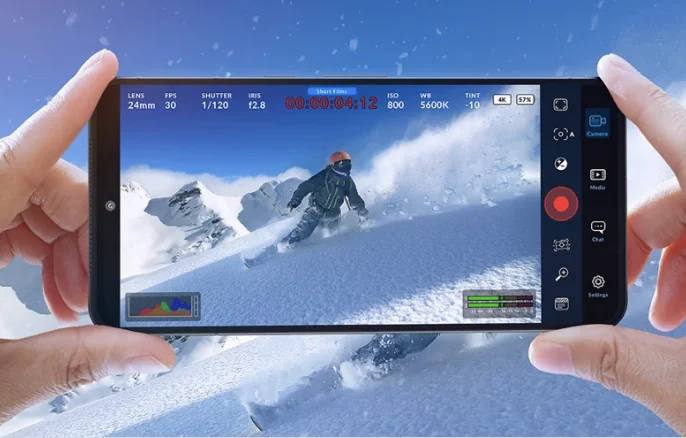
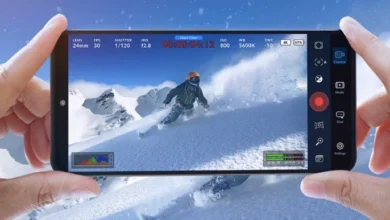
Blackmagic Design has released the Blackmagic Camera for Android 3.4 Update, a significant enhancement that brings a suite of professional-grade features to Android users, further blurring the lines between dedicated cinema cameras and high-end mobile devices. The update introduces critical functionalities such as 4K HDMI video output with audio, camera control via WearOS companion apps, and robust REST API remote control, alongside practical workflow improvements like continuous recording pause, support for Blackmagic Focus and Zoom demands, and an integrated proxy clip manager. These additions underscore Blackmagic Design’s ongoing commitment to democratizing professional filmmaking tools and integrating mobile platforms into their comprehensive production ecosystem.
Background: Blackmagic Design’s Vision and the Mobile Revolution
Blackmagic Design, an Australian digital cinema company renowned for its high-quality yet affordable professional video equipment and software, has been a transformative force in the film and television industry for over two decades. From its beginnings with capture cards, the company expanded into digital film cameras, post-production software (DaVinci Resolve), switchers, and monitoring solutions, consistently challenging established market norms by offering powerful tools at accessible price points. Their philosophy centers on empowering creators by providing professional-grade technology without prohibitive costs.
The introduction of the Blackmagic Camera app, first for iOS and later for Android, marked a strategic expansion into the mobile filmmaking arena. Recognizing the ubiquitous presence and increasing computational power of smartphones, Blackmagic Design aimed to bring its signature user interface, advanced color science, and robust recording capabilities to handheld devices. This move resonated with a growing segment of content creators, from independent filmmakers and journalists to social media influencers, who sought to leverage their smartphones for higher-quality video production without investing in expensive dedicated camera setups. The Android version, launched after its iOS counterpart, faced the inherent challenges of platform fragmentation and diverse hardware specifications but promised to bring Blackmagic’s professional workflow to an even wider global audience. The 3.4 update specifically addresses many of the limitations previously associated with mobile video production, pushing the boundaries of what’s achievable with an Android device.
A Closer Look at Blackmagic Camera for Android 3.4: Key Enhancements
The Blackmagic Camera for Android 3.4 update is not merely an incremental revision but a substantial upgrade that introduces capabilities previously reserved for dedicated professional cameras. Each new feature is designed to enhance workflow, improve image fidelity, and provide greater control for serious videographers and filmmakers.
4K HDMI Output: Elevating Monitoring and External Recording
One of the most critical additions in version 3.4 is the support for 4K HDMI video output, complete with audio. This feature allows users to connect their Android device, running the Blackmagic Camera app, to external monitors, recorders, or live production switchers via an HDMI cable. The ability to output a clean, high-resolution 4K signal (presumably at various frame rates supported by the device) transforms the Android phone from a standalone recording unit into a viable component of a larger production setup.
For filmmakers, this means the possibility of using professional field monitors for accurate framing, focus peaking, and exposure analysis, which are often superior to the phone’s built-in screen, especially in bright conditions. For live streamers and broadcasters, the clean HDMI output is invaluable for integrating the Android camera feed directly into a live production switcher, such as Blackmagic’s own ATEM Mini series, allowing for multi-camera productions with a mobile device as a high-quality source. Furthermore, external recording to devices like Blackmagic Video Assist or Atomos Ninja/Shogun recorders can bypass internal compression limitations, potentially allowing for higher bitrates, more robust codecs (e.g., ProRes or Blackmagic RAW, if supported by the phone’s hardware and the app’s internal processing), and longer recording times, depending on the external recorder’s capabilities. The inclusion of HDMI audio output ensures a complete professional signal chain, eliminating the need for separate audio routing in many scenarios.
WearOS Control: Enhanced Operability and Field Convenience
The integration of camera control via a companion app for WearOS smartwatches introduces a new level of convenience and remote operability. WearOS, Google’s operating system for smartwatches, allows users to control various functions of their Android phone from their wrist. For filmmakers, this means starting/stopping recording, adjusting settings (like ISO, shutter speed, aperture, white balance), and potentially even monitoring basic camera status without physically touching the phone.
This feature is particularly beneficial in scenarios where direct access to the phone is difficult or undesirable. Imagine a phone mounted on a gimbal for smooth tracking shots, placed in a tight spot for a unique angle, or used as a crash cam. A single operator can maintain full control over the camera while simultaneously managing other aspects of the shoot. It enhances discreet filming capabilities, allows for quick adjustments during a take, and significantly improves the workflow for single-person crews or complex multi-camera setups where physically accessing each phone might be cumbersome.
REST API: Unlocking Advanced Remote Production Workflows
The support for remote control via REST API (Representational State Transfer Application Programming Interface) is a highly technical yet profoundly impactful addition. A REST API provides a standardized, flexible way for different software applications to communicate over a network. For the Blackmagic Camera app, this means that third-party developers, system integrators, or advanced users can write custom software to control the camera remotely.
This capability opens up vast possibilities for sophisticated production workflows. Broadcast studios can integrate Android phones into their existing control systems, allowing for automated camera movements or synchronized recording across multiple devices. Virtual production environments could use REST API to trigger recordings or change camera settings based on virtual scene events. For multi-camera setups, a single master control application could manage numerous Android phones simultaneously, adjusting parameters, initiating recording, and monitoring status from a central location. This level of programmability elevates the Blackmagic Camera for Android from a simple app to a powerful, network-addressable camera module, suitable for complex professional deployments.
Continuous Recording Pause: Streamlining On-Set Workflow
The addition of support for continuous recording with a pause function is a practical workflow improvement that addresses a common pain point in mobile video production. Previously, stopping a recording typically meant creating a new file upon resuming. With the pause feature, users can temporarily halt recording within a single clip and resume it without generating a new file.
This is invaluable for interview setups, long takes, or documentary-style shooting where brief interruptions (e.g., waiting for talent, adjusting a prop, a slight technical hitch) might occur. Instead of having multiple short clips that need to be stitched together in post-production, a single, coherent clip is maintained, simplifying file management and reducing editing overhead. It ensures greater continuity for specific takes, making the editing process more efficient and less prone to errors in clip organization.
Blackmagic Focus and Zoom Demands: Precision Control for Mobile Cinematography
The support for Blackmagic Focus and Zoom demands represents a significant step towards integrating the Android device into Blackmagic’s established ecosystem of professional hardware. Blackmagic Design produces dedicated hardware accessories, known as Focus and Zoom demands, which provide precise, tactile control over lens focus and zoom for compatible cinema cameras.
By enabling the Blackmagic Camera for Android app to interface with these demands, users gain a level of granular control over focus and zoom that is virtually impossible with touch-screen interfaces. This is critical for achieving professional-looking rack focuses, smooth zooms, and maintaining sharp focus, especially with external lenses or lens adapters that might be used with the phone. It turns the mobile device into a more responsive and controllable camera instrument, bridging the gap between mobile operation and traditional camera operator techniques. This move reinforces Blackmagic’s strategy of creating a unified hardware and software ecosystem where components seamlessly interact to enhance production quality.

Remote Support for Immersive Camera: Pioneering New Content Frontiers
The mention of "Remote support for Immersive Camera" points towards Blackmagic Design’s engagement with emerging content formats, particularly in the realm of spatial computing, virtual reality (VR), and augmented reality (AR). While details are succinct, it likely implies that the Blackmagic Camera for Android app can now remotely control or integrate with Blackmagic’s Immersive Camera (such as the one recently developed for Apple Vision Pro content creation).
This suggests Blackmagic’s forward-thinking approach to new media. As platforms like the Apple Vision Pro and other spatial computing devices gain traction, the demand for high-quality immersive content will grow. Allowing an Android device to remotely manage or contribute to the capture process for such specialized cameras streamlines production workflows for creators venturing into these innovative fields. It positions the Android app as a versatile control hub, not just for traditional video, but for next-generation visual experiences.
New Remote Camera Manager: Orchestrating Multi-Camera Setups
The addition of a "New Remote Camera Manager" is a logical extension of the REST API and WearOS control features, designed to streamline complex multi-camera productions. This manager likely provides a centralized interface within the app (or a complementary tool) to discover, connect to, and control multiple Blackmagic cameras or Android devices running the Blackmagic Camera app simultaneously.
For scenarios requiring multiple camera angles—such as interviews with several subjects, event coverage, or studio productions—a remote camera manager significantly enhances efficiency. Operators can monitor the status of all connected cameras, adjust settings, and initiate/stop recording across the entire setup from a single point of control. This reduces setup time, minimizes human error, and ensures consistency across all captured footage, crucial for professional multi-camera editing workflows.
Proxy Clip Manager: Accelerating Post-Production
Finally, the "Added Proxy Clip Manager" is a crucial feature for optimizing the post-production workflow, especially when dealing with high-resolution footage (e.g., 4K). Proxy clips are lower-resolution, more manageable copies of original camera footage. Editors work with these smaller proxy files during the editing process, which dramatically speeds up performance, particularly on less powerful editing workstations or for mobile editing workflows. Once editing is complete, the final project can be conformed back to the original high-resolution footage for export.
For Android users, this means they can record in the highest quality available from their phone, generate proxies on the device or quickly ingest them, and then begin editing immediately, even on a tablet or a laptop with modest specifications. This feature is a cornerstone of professional post-production workflows, enabling faster turnaround times and more efficient resource utilization. It underscores Blackmagic Design’s holistic approach, considering not just capture but the entire production pipeline.
Broader Implications: Democratizing High-End Production
The Blackmagic Camera for Android 3.4 update carries significant implications for the broader filmmaking and content creation landscape. By introducing features traditionally found only in high-end cinema cameras or professional broadcast setups, Blackmagic Design continues its mission of democratizing access to powerful tools.

The ability to output 4K HDMI with audio, control via WearOS, and manage devices through a REST API transforms an Android smartphone from a casual video recorder into a legitimate, versatile production tool. This empowers a new generation of filmmakers, journalists, and educators to produce high-quality content without the prohibitive cost barriers of traditional equipment. It fosters innovation by allowing creators to experiment with mobile devices in ways previously unimaginable, potentially leading to new forms of storytelling and production methodologies.
Industry Perspectives and Expert Commentary
While specific official statements were not provided in the original text, one can infer the likely reception and strategic intent. A spokesperson for Blackmagic Design might emphasize the company’s commitment to empowering creators on all platforms, stating something akin to, "Our goal has always been to remove barriers to high-quality content creation. With the Blackmagic Camera for Android 3.4 update, we are bringing unprecedented professional control and integration to the Android ecosystem, allowing filmmakers to achieve their creative vision with the devices they already carry."
Industry analysts would likely highlight the strategic importance of these updates in the context of the evolving media landscape. "Blackmagic Design is intelligently leveraging the immense processing power and connectivity of modern smartphones," an analyst might observe. "The inclusion of features like 4K HDMI out and REST API not only makes Android phones viable B-cams or specialty cameras but also positions them as integral components within larger, sophisticated production environments. This strategy broadens Blackmagic’s ecosystem reach and reinforces the trend of mobile devices becoming serious production tools."
Professional users, particularly those working on independent projects or run-and-gun documentary shoots, would likely welcome the practical enhancements. A freelance cinematographer might comment, "The continuous recording pause is a game-changer for my documentary work, saving me countless hours in post. And the ability to use my Blackmagic Focus and Zoom demands with my phone means I can maintain professional control even when shooting with a minimalist setup."
The Blackmagic Ecosystem: A Unified Approach
These updates are not isolated features but integral parts of Blackmagic Design’s broader strategy to create a seamless, integrated ecosystem of hardware and software. By enabling Android phones to interact with Blackmagic monitors, switchers, and control demands, the company encourages users to invest further in their product line. DaVinci Resolve, Blackmagic’s powerful editing, color grading, VFX, and audio post-production software, serves as the central hub, effortlessly integrating footage captured by the Blackmagic Camera app (especially with proxy workflows). This synergistic approach provides a cohesive and efficient workflow from capture to final delivery, a significant advantage for creators who appreciate a unified production environment.
Timeline: Evolution of Blackmagic’s Mobile Strategy
- 2003: Blackmagic Design founded, initially focusing on capture cards.
- Early 2010s: Expansion into digital cinema cameras (e.g., Cinema Camera, Pocket Cinema Camera series) and acquisition of DaVinci Resolve.
- 2014: Blackmagic launches the URSA camera, further expanding its professional camera lineup.
- Late 2010s: Increasing recognition of smartphone capabilities in video.
- September 2023: Blackmagic Camera app for iOS is released, bringing a professional camera interface, advanced controls, and Blackmagic color science to iPhones.
- December 2023: Blackmagic Camera app for Android is released, extending the professional mobile camera experience to the Android platform, albeit with initial feature parity variations due to hardware diversity.
- Early 2024: Introduction of the Blackmagic Cinema Camera 6K and Blackmagic Micro Studio Camera 4K G2, further cementing their ecosystem.
- June 2024 (Approximate): Blackmagic Camera for Android 3.4 Update released, introducing 4K HDMI output, WearOS control, REST API, continuous recording pause, Blackmagic Focus and Zoom demand support, remote immersive camera support, new remote camera manager, and proxy clip manager, significantly enhancing its professional capabilities and closing the feature gap with its iOS counterpart in key areas.
Conclusion: The Future of Mobile Filmmaking
The Blackmagic Camera for Android 3.4 Update represents a pivotal moment in the evolution of mobile filmmaking. By integrating advanced features like 4K HDMI output, sophisticated remote control options, and professional workflow tools, Blackmagic Design is not just improving an app; it is redefining the capabilities of the Android smartphone as a serious tool in professional video production. These enhancements solidify the mobile device’s position not merely as a convenient B-camera but as a potentially primary capture device, seamlessly integrated into a larger, professional ecosystem. As mobile hardware continues to advance, and software solutions like Blackmagic Camera become more sophisticated, the line between dedicated cinema cameras and high-end smartphones will continue to blur, empowering a new wave of creators with unprecedented access to cinematic quality.
Related posts: