Mastering Hover Scrub in Adobe Premiere Pro: A Deep Dive into an Enduring and Essential Editing Workflow Enhancement

The Hover Scrub feature, introduced to Adobe Premiere Pro way back in 2012 as part of the CS6 release, stands as a testament to thoughtful user interface design and workflow efficiency. Despite its longevity, now approaching nearly fifteen years since its debut, it remains a surprisingly underutilized tool by a significant portion of the editing community, both seasoned professionals and newcomers alike. This often leads to a less streamlined pre-editing process than what is readily achievable within Adobe’s flagship non-linear editing (NLE) software. The utility of Hover Scrub lies in its ability to transform how editors interact with raw footage, offering a fluid and immediate visual feedback mechanism that dramatically accelerates the initial stages of project assembly and media management.
The Genesis of Efficiency: Hover Scrub’s Introduction with Premiere Pro CS6
The year 2012 marked a significant period for Adobe and the professional video editing landscape. Adobe Premiere Pro CS6 was a landmark release, bringing a host of powerful new features and performance enhancements that solidified its position as a major contender against established NLEs like Avid Media Composer and Apple’s Final Cut Pro, especially after the divisive introduction of Final Cut Pro X in 2011. Among the many innovations, which included a revamped Mercury Playback Engine with improved GPU acceleration, enhanced multicam editing, and a more robust trim mode, Hover Scrub emerged as a seemingly minor yet profoundly impactful addition to the editor’s toolkit.
At the time, the demand for faster content creation and quicker turnaround times was already escalating, driven by the proliferation of online video platforms and the increasing complexity of post-production workflows. Editors were frequently dealing with larger volumes of footage, necessitating more efficient ways to sift through clips and make initial selections. Before Hover Scrub, the standard procedure for reviewing clips involved double-clicking each one to load it into the Source monitor, then manually scrubbing through it or playing it back. This repetitive action, while fundamental, could become a significant bottleneck when dealing with hundreds or even thousands of individual media files.
Adobe’s development philosophy during this era was keenly focused on addressing such workflow friction points. The introduction of Hover Scrub reflected an understanding that efficiency gains, however small in isolation, accumulate to substantial time savings over the course of a project. It empowered editors to quickly audition clips directly within the Project panel (then often referred to as a "bin"), bypassing the need to commit them to the Source monitor for a preliminary review. This innovation was part of a broader strategy by Adobe to make Premiere Pro more intuitive, responsive, and ultimately, more competitive for a diverse range of editing professionals. The feature’s seamless integration into the existing UI without requiring complex new controls showcased Adobe’s commitment to enhancing user experience through intelligent, unobtrusive design.
Understanding the Mechanics: How Hover Scrub Operates

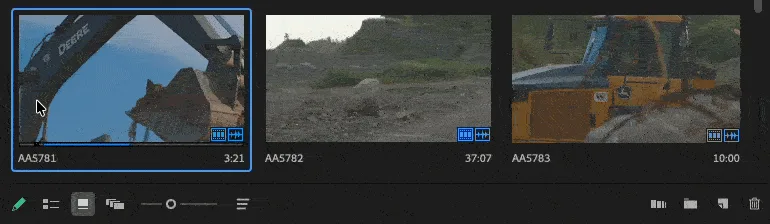
Hover Scrub functions precisely as its name implies: it allows users to "scrub" through the content of a video clip merely by hovering their mouse pointer over its thumbnail in the Project panel. This real-time preview mechanism activates when the Project panel is set to Icon view or Freeform view, both of which display clips as visual thumbnails rather than a text-based list.
When an editor moves their mouse cursor over a clip’s thumbnail, the video content within that thumbnail begins to play or scrub as the cursor moves back and forth across its width. Moving the mouse to the left of the thumbnail scrubs backward in the clip, while moving it to the right scrubs forward. The speed of the scrub is typically proportional to the speed at which the mouse is moved. This intuitive interaction eliminates the need for a click-and-load cycle, providing instant visual access to the clip’s entire duration. The beauty of this system is that it does not consume additional system resources by loading the clip into the Source monitor until explicitly requested, thus maintaining a fluid and responsive experience, particularly beneficial when working with high-resolution footage or on systems with moderate specifications.
Configuration and Accessibility
For most users, Hover Scrub should be enabled by default in Adobe Premiere Pro. However, if an editor finds that the feature is not active, enabling it is a straightforward process. The setting is accessed via the "hamburger" menu—a three-horizontal-line icon—located in the upper left-hand corner of the Project panel. Clicking this menu reveals a dropdown list of options pertaining to the Project panel’s display and behavior. Within this menu, users will find a "Hover Scrub" option, which can be toggled on or off by checking or unchecking the corresponding box.
It is crucial to reiterate that Hover Scrub is exclusively functional within the Icon view or Freeform view of the Project panel. In List view, where clips are displayed as a textual list with minimal thumbnail representation, the visual interaction required for Hover Scrub is not possible. This dependency on thumbnail display underscores the feature’s design as a visual browsing and pre-selection tool. The consistency of its functionality across various Premiere Pro versions since CS6 further highlights its foundational role in the software’s workflow paradigm.
Optimizing Workflow: Leveraging Hover Scrub for Maximum Efficiency
While the basic functionality of Hover Scrub is simple, its true power lies in how effectively an editor integrates it into their daily workflow. There are several advanced techniques and considerations that can elevate its utility from a mere preview tool to a fundamental component of rapid media assessment and initial editing.

1. Dynamic Thumbnail Sizing for Enhanced Visual Context:
One of the most immediate ways to enhance the Hover Scrub experience is by adjusting the size of the clip thumbnails within the Project panel. Premiere Pro allows users to scale thumbnails from very small icons to nearly the size of the Source monitor itself. By increasing the thumbnail size, editors gain a much larger, more detailed view of the clip while hover-scrubbing. This larger canvas provides better visual clarity, making it easier to identify specific actions, expressions, or visual cues within the footage. For editors working on large monitors or multi-monitor setups, maximizing thumbnail size can effectively turn the Project panel into a multi-preview window, allowing for simultaneous, albeit quick, assessment of multiple clips without ever leaving the bin. This is particularly valuable for projects involving extensive b-roll, interviews, or event coverage where rapid visual parsing is paramount.
2. Direct In-and-Out Point Marking and Bin-to-Timeline Editing:
Hover Scrub is not merely for passive viewing; it is an active pre-editing tool. As an editor scrubs over a clip, they can immediately mark "in" and "out" points using the ‘I’ and ‘O’ keys on the keyboard, respectively. This allows for precise segment selection directly within the Project panel thumbnail. Once an in-to-out range is defined, the editor can then perform an "insert" or "overwrite" edit directly from the bin to the active sequence in the timeline. By clicking the clip (with the marked in/out points) and then using the assigned keyboard shortcuts for insert (typically ‘,’ comma) or overwrite (typically ‘.’ period), the selected portion of the clip is instantly placed into the timeline. This capability dramatically speeds up the assembly edit process, allowing editors to quickly string together a rough cut or create a sequence of selects without constantly loading clips into the Source monitor and dragging them down. This method is particularly favored in documentary filmmaking, news editing, or reality TV production where quick assembly of raw footage is often the first pass.
3. Seamless Transition to the Source Monitor with Playhead Retention:
Perhaps one of the most elegant and time-saving aspects of Hover Scrub is its intelligent integration with the Source monitor. If an editor is hover-scrubbing a clip and decides that a particular frame or section warrants closer inspection, a simple double-click on the thumbnail will load that clip into the Source monitor. Crucially, the playhead in the Source monitor will automatically be positioned at the exact frame where the cursor was last located during the hover-scrub. This feature eliminates the need to re-scrub or re-locate a specific moment once the clip is loaded for detailed review. It creates a fluid transition from a quick overview to precise frame-accurate editing, allowing editors to identify a moment of interest with Hover Scrub and then instantly dive into fine-tuning with the full capabilities of the Source monitor. This level of seamless interaction significantly reduces cognitive load and keeps the editor in a productive flow state.
Broader Impact and Implications for Modern Editing Workflows
The enduring relevance of Hover Scrub, nearly a decade and a half after its inception, underscores its fundamental value in modern video editing. Its implications extend beyond mere convenience, touching upon workflow efficiency, user experience, and the strategic management of increasingly large media libraries.
Workflow Efficiency and Time Savings: In an industry where deadlines are tight and content volumes are ever-growing, any feature that reduces clicks and speeds up media assessment is invaluable. Hover Scrub offers significant time savings, especially when dealing with projects involving extensive raw footage—be it hours of interview material, drone shots, or multi-camera event recordings. For instance, a documentary editor sifting through 50 hours of footage might save several minutes per hour by using Hover Scrub for initial passes, accumulating to hours saved over a large project. This efficiency translates directly into more time for creative decision-making, refining edits, or meeting aggressive delivery schedules. It allows for a more rapid "first pass" through footage, enabling editors to quickly identify usable takes, discard irrelevant material, and form a mental map of their available assets.
Enhanced User Experience and Reduced Cognitive Load: The intuitive nature of Hover Scrub reduces the cognitive load on the editor. Instead of a multi-step process (click, load, scrub, unload, repeat), it offers a direct, single-action preview. This frictionless interaction keeps the editor’s focus on the creative task rather than the mechanics of the software. A smoother user experience contributes to less fatigue and a more enjoyable editing process, which can indirectly lead to better creative output.

Training and Adoption Challenges: The fact that many editors remain unaware of Hover Scrub highlights a perennial challenge in professional software adoption: the sheer depth and breadth of features in applications like Premiere Pro. While Adobe continuously rolls out new functionalities, older, foundational features can sometimes be overlooked in training and self-learning paths. This underscores the importance of comprehensive training and continuous exploration of the software by users to unlock its full potential. For new editors, discovering such features early on can set them on a path to highly efficient workflows from the outset.
Adobe’s Design Philosophy and Iterative Improvement: Hover Scrub exemplifies Adobe’s commitment to iterative improvements and user-centric design. It’s not a flashy, headline-grabbing feature, but a practical, workflow-enhancing tool born from observing how editors interact with their media. Its continued presence and stable functionality across numerous Premiere Pro updates (from CS6 through the Creative Cloud era) demonstrate its proven utility and solid architectural integration. This approach to software development, focusing on both groundbreaking new features and refining existing core functionalities, is crucial for maintaining a robust and competitive NLE platform.
Conclusion
Hover Scrub is far more than a simple preview function; it is a sophisticated, deeply integrated tool that empowers Adobe Premiere Pro users to audit and review their footage with unprecedented speed and fluidity. Its ability to provide instant visual feedback, facilitate direct in/out marking, and seamlessly transition to detailed Source monitor review makes it an indispensable asset for editors grappling with large volumes of media. For those who have yet to incorporate it into their workflow, enabling and mastering Hover Scrub represents an immediate and tangible opportunity to significantly enhance editing efficiency, reduce turnaround times, and foster a more intuitive and enjoyable creative process within Adobe Premiere Pro. Its enduring presence and continued relevance are a testament to its elegant design and profound impact on the daily lives of video editing professionals.
Related posts: