
How to Master Instagram Story Scheduling: A Comprehensive Guide to Professional Content Management

The Instagram landscape has evolved significantly since the platform introduced Stories in 2016, transforming from a simple photo-sharing app into a robust ecosystem for business and creator monetization. As of November 2026, one of the most persistent limitations for social media managers remains the lack of native scheduling functionality for ephemeral content within the primary Instagram application. While Meta’s built-in scheduler facilitates the automation of Reels, static photos, and carousel posts, Stories—the platform’s most engaging, high-frequency format—remain excluded from native, in-app scheduling. This technical barrier has forced brands, agencies, and individual creators to adopt third-party software or utilize Meta’s secondary platform, the Meta Business Suite, to maintain a consistent digital presence.
For businesses aiming to reach audiences across multiple time zones or maintain content calendars that span several weeks, the inability to schedule Stories natively represents a significant bottleneck. This article examines the technical requirements, strategic implications, and operational best practices for automating the delivery of Instagram Stories to ensure a consistent and high-quality audience experience.

The Technical Landscape of Social Media Scheduling
The evolution of Instagram’s API (Application Programming Interface) has dictated how external developers integrate with the platform. While Meta has gradually opened its API to allow for direct posting, the ephemeral nature of Stories—which often feature interactive elements like polls, music, and link stickers—creates complex constraints for automated systems.
Currently, there are two primary pathways for professional accounts to schedule Stories. The first is Meta Business Suite, a free, proprietary management tool provided by Meta specifically for Facebook and Instagram business profiles. The second involves third-party social media management platforms such as Buffer. These tools act as a middleware, interfacing with the Instagram API to queue content.
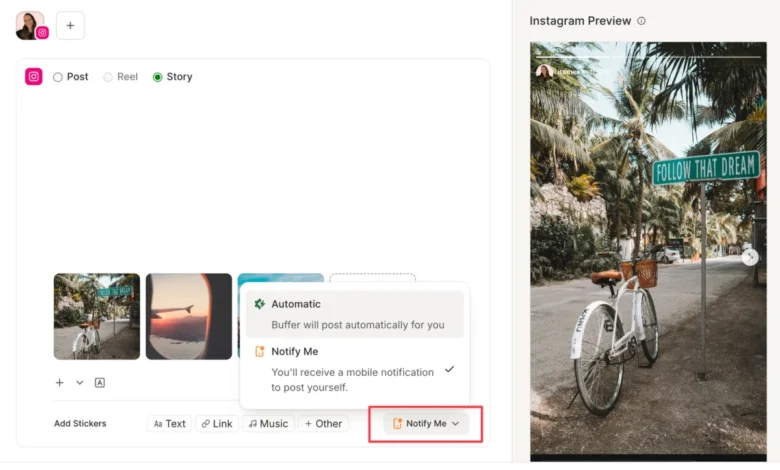
However, the "auto-publish" capability is not universal. It is strictly limited by the type of content included in the post. If a story contains native interactive elements—such as a link sticker, a music overlay, or a poll—the Instagram API generally prevents it from being published automatically by a third-party server. In these instances, the scheduler employs a "Notify Me" workflow, which functions as a bridge. The user receives a push notification on their mobile device at the designated time, which then opens the prepared assets directly in the Instagram app, allowing the user to manually apply the final stickers or interactive elements before publishing.

Comparative Analysis: Meta Business Suite vs. Third-Party Tools
When evaluating which scheduling infrastructure to adopt, organizations must weigh the benefits of native integration against the advanced functionality offered by independent management platforms.
Meta Business Suite offers a distinct advantage regarding API stability and immediate access to new platform features. Because it is owned and operated by Meta, the tool is typically the first to receive updates concerning algorithm changes or new creative tools. It serves as a centralized hub for managing cross-platform engagement on both Facebook and Instagram, making it an essential, cost-free utility for small businesses.
Conversely, third-party platforms like Buffer prioritize workflow efficiency and cross-platform synergy. While Meta Business Suite is confined to the Facebook-Instagram ecosystem, Buffer allows for the management of diverse platforms—including X (formerly Twitter), LinkedIn, and TikTok—under a single dashboard. Furthermore, these platforms often provide superior calendar visualization, team-based approval workflows, and centralized content libraries that allow users to store and repurpose media assets. For agencies managing multiple client accounts, the ability to assign roles and manage internal approval processes within a dedicated tool provides a layer of administrative oversight that Meta’s basic interface lacks.

Strategic Implications of Consistent Scheduling
The necessity for scheduling tools is driven by the demands of the Instagram algorithm. According to industry data and statements from platform leadership, the visibility of Stories is heavily indexed on a user’s likelihood to engage—specifically through taps, likes, or direct replies.
Consistency serves as the foundational element of this engagement strategy. By batching content creation into a single session, creators can maintain a steady stream of content even during periods of high operational load. This approach mitigates the risk of "content decay," where long gaps in posting result in lower visibility when the creator eventually returns to the platform.
Furthermore, the practice of "batching" improves the quality of the content. By stepping away from the "on-the-fly" model of posting, creators can focus on aesthetic cohesion, high-resolution editing, and strategic messaging that aligns with broader marketing goals. This shift from reactive to proactive content management allows for more accurate tracking of key performance indicators (KPIs), such as swipe-through rates and link-click conversion, which are critical for measuring the return on investment of social media marketing efforts.

Operational Workflow: Step-by-Step Implementation
To effectively integrate scheduling into a social media strategy, users must adhere to a standardized, four-step process.
- Media Preparation: Before opening any scheduling tool, ensure that all media is formatted correctly. The industry standard for Instagram Stories is a 9:16 aspect ratio (1080px by 1920px). Using images or videos that deviate from these dimensions often leads to improper cropping, which can obscure text or brand logos.
- Platform Upload and Queueing: Within the chosen tool (e.g., Buffer), the user initiates a "Create Post" command and selects the "Story" format. It is essential to understand that each individual image or video file constitutes a single Story frame. If a narrative requires multiple frames, they must be scheduled sequentially to ensure they appear in the correct order.
- Refinement and Metadata: Once the media is uploaded, users should perform necessary edits—such as cropping, straightening, or color correction—directly within the tool’s interface. If the story requires interactive elements, the user must select the "Notify Me" option. This prompts the user to add a placeholder or note, ensuring that when the notification arrives, the user knows exactly which link or music track to apply.
- Temporal Scheduling: Finally, the user sets the delivery time. Advanced tools often include "Best Time to Post" algorithms, which analyze historical engagement data to suggest optimal windows for maximum visibility. Once confirmed, the post is added to the queue, and the system handles the remainder of the process.
Addressing the "Notify Me" Constraint
A common frustration for social media managers is the inability to fully automate stories that contain stickers or links. While this may seem like an inefficiency, it is a deliberate design choice by Instagram to protect the integrity of the user experience. By requiring a final manual step for interactive content, the platform ensures that elements like polls and sliders remain natively functional and responsive to current platform updates.
To streamline this, successful managers utilize a checklist-based approach. By including a "Reminders" note in the scheduling tool—listing the exact URL to be pasted or the specific song to be selected—the final manual step can be reduced to a matter of seconds. This hybrid approach—combining the power of automation for media delivery with the precision of manual application for interactive elements—represents the most sophisticated way to manage a high-volume Instagram presence.

Future Outlook and Best Practices
As of November 2026, the industry consensus is that social media managers must prioritize high-quality, authentic storytelling over mass-produced, automated filler. While scheduling tools are powerful, they should be used to augment, not replace, the spontaneity that makes Stories unique.
Key recommendations for ongoing management include:
- Audit Regularly: Review your scheduling calendar monthly to ensure the content mix remains diverse, alternating between promotional material, behind-the-scenes glimpses, and interactive content.
- Leverage Analytics: Use the reporting features within your scheduler to identify which types of stories drive the most engagement. If "Behind the Scenes" stories consistently outperform polished advertisements, shift your content calendar accordingly.
- Maintain Brand Guidelines: Use consistent fonts, colors, and design templates. Even if a story is scheduled days in advance, it should feel like part of a cohesive brand voice.
- Engage with the Community: Scheduling content is only half the battle. A truly successful strategy includes dedicated time to engage with replies and reactions. Automation should provide the user with more time for community management, not less.
In conclusion, while the absence of a native scheduling feature for Instagram Stories poses a structural challenge, it has catalyzed a robust market of management solutions that offer users unprecedented control over their digital footprint. By leveraging tools like Meta Business Suite and Buffer, businesses can achieve the consistency required for algorithmic favor while maintaining the creative flexibility needed to resonate with their audience. As the platform continues to iterate, the ability to balance automated efficiency with human-centric engagement will remain the definitive marker of a successful social media strategy.