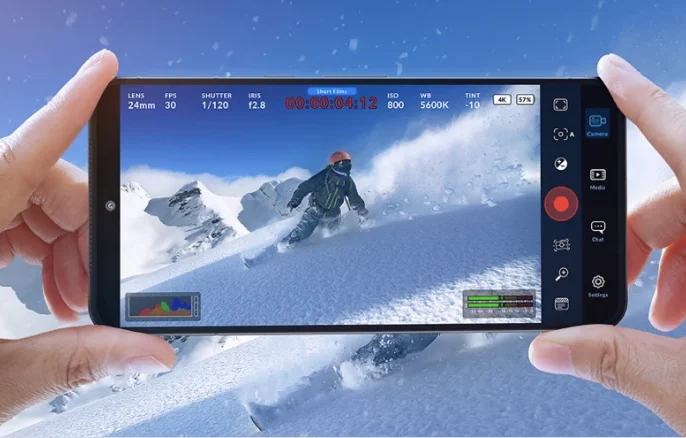
Blackmagic Design, a global leader in creative video technology, has officially rolled out the Blackmagic Camera for Android 3.4 Update, a pivotal release that substantially elevates the professional filmmaking capabilities available on Android smartphones. This latest iteration introduces a suite of features previously reserved for dedicated cinema cameras, including robust 4K HDMI video and audio output, intuitive camera control via WearOS devices, comprehensive remote operation through a REST API, and refined workflow efficiencies such as continuous recording pause, direct support for Blackmagic Focus and Zoom demands, and integrated proxy clip management. These enhancements underscore Blackmagic Design’s ongoing commitment to democratizing high-end production tools, making professional-grade cinematography more accessible to a broader spectrum of creators utilizing the ubiquitous smartphone platform.
The release of the Blackmagic Camera for Android 3.4 Update marks a significant milestone in the evolving landscape of mobile filmmaking. Since its initial debut on iOS in September 2023, followed by its expansion to Android, Blackmagic Design’s camera application has been lauded for bringing an unprecedented level of manual control, cinematic codec support, and professional-grade color science to smartphones. This update further blurs the lines between traditional cinema cameras and mobile devices, offering a compelling proposition for independent filmmakers, documentarians, content creators, and even broadcast professionals seeking agile and high-quality production solutions.
Background: Blackmagic Design’s Vision for Accessible Cinema
Blackmagic Design has long been synonymous with innovation in the professional video industry. Founded in 2001, the company initially gained prominence for its high-quality capture cards before revolutionizing various segments of the market with products like the DaVinci Resolve color grading software (acquired in 2009), which transformed from an expensive, specialized system into a powerful, free-to-use industry standard. Their subsequent foray into camera manufacturing with the Blackmagic Cinema Camera in 2012, followed by the highly successful Pocket Cinema Camera series, disrupted the market by offering cinema-grade image quality, RAW recording capabilities, and extensive manual controls at price points previously unimaginable.
This philosophy of democratizing high-end tools naturally extended to mobile platforms. Recognizing the exponential advancements in smartphone camera hardware and processing power, Blackmagic Design envisioned a future where the device in nearly everyone’s pocket could serve as a legitimate tool for serious filmmaking. The Blackmagic Camera app, first launched for iOS and then Android, was born from this vision. It bypassed the limitations of native smartphone camera apps, providing direct control over crucial parameters like ISO, shutter angle, white balance, and tint, alongside support for industry-standard codecs like Blackmagic RAW and Apple ProRes, and offering features like LUT application and metadata editing. The 3.4 update is a continuation of this strategic expansion, integrating mobile devices more deeply into professional production ecosystems.
Key Enhancements and Their Implications for Filmmakers
The Blackmagic Camera for Android 3.4 Update introduces several pivotal features, each designed to address specific needs within a professional video production workflow.
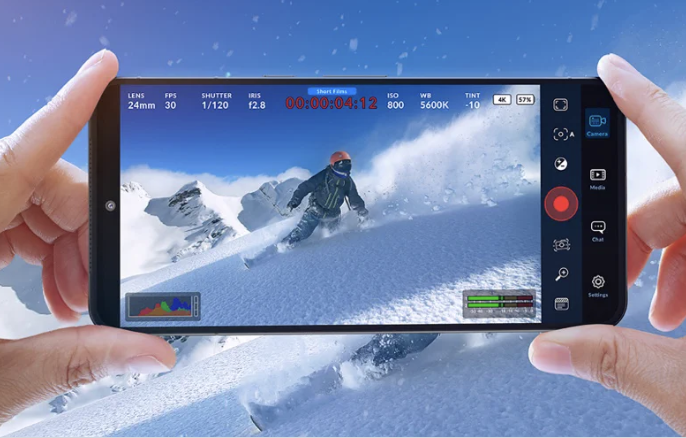
1. Support for 4K HDMI Video and Audio Output:
Perhaps the most impactful feature, the addition of 4K HDMI output with accompanying audio output, transforms an Android phone into a truly viable component of a professional video chain. Previously, monitoring or integrating a phone’s output into a larger system often relied on less robust methods or lower resolutions. With 4K HDMI out, filmmakers can now:
- External Monitoring: Connect their smartphone directly to professional field monitors, client monitors, or even large displays for critical evaluation of focus, exposure, and composition in real-time. This is crucial on set for directors, cinematographers, and focus pullers.
- Live Streaming and Broadcast Integration: Feed high-quality 4K video and audio directly into live production switchers (like Blackmagic ATEM switchers) or streaming encoders. This capability is revolutionary for mobile journalism, live event coverage, and remote broadcasting, allowing for a compact, high-quality camera source.
- External Recording: Bypass the phone’s internal storage limitations or specific codec requirements by routing the clean 4K signal to an external recorder, which can capture in various formats, potentially even higher bitrates or different codecs if desired.
- Enhanced Collaboration: Provide a clear, high-resolution feed for remote teams or on-set collaborators, facilitating immediate feedback and decision-making.
This feature leverages the increasing processing power and display capabilities of modern Android flagships, effectively turning them into compact, yet powerful, professional video sources. The inclusion of audio output alongside video is critical for maintaining synchronization and ensuring a complete signal chain.
2. Camera Control with Companion App for WearOS:
The introduction of a companion app for WearOS devices brings unparalleled convenience and flexibility, particularly for solo operators, complex rigging scenarios, or situations where the camera is placed in an inaccessible location. With a WearOS smartwatch, users can now:
- Remote Start/Stop Recording: Initiate and cease recording without directly touching the phone, minimizing camera shake and allowing for quick reactions.
- Basic Camera Settings Adjustment: Potentially control key parameters like ISO, shutter speed, or white balance directly from their wrist, offering quick adjustments during a take or when the phone is mounted on a gimbal, crane, or drone.
- Monitoring Status: View recording status, battery life, and remaining storage at a glance.
This capability significantly enhances the usability of the Blackmagic Camera app in dynamic shooting environments, making it ideal for run-and-gun scenarios, action sequences, or when operating the camera from a distance. It’s a testament to Blackmagic Design’s understanding of practical production challenges and their commitment to providing solutions that streamline workflows.
3. Support for Remote Control via REST API:
For advanced users, multi-camera setups, or integrated production environments, the implementation of a REST API (Representational State Transfer Application Programming Interface) for remote control is a game-changer. A REST API allows external software and hardware systems to communicate with and control the camera app programmatically. This opens up a vast array of possibilities:
- Custom Control Interfaces: Developers can create bespoke control panels or applications tailored to specific production needs.
- Multi-Camera Synchronization: Control multiple Android phones running the Blackmagic Camera simultaneously, crucial for virtual production, volumetric capture, or complex event coverage.
- Automated Workflows: Integrate the camera into automated systems, motion control rigs, or time-lapse setups, where precise timing and control are essential.
- Broadcast Integration: Allow broadcast control systems to manage mobile camera feeds alongside traditional broadcast cameras.
The REST API positions the Blackmagic Camera app not just as a standalone tool, but as an integral, controllable component within a sophisticated production infrastructure, reflecting Blackmagic Design’s expertise in providing open and flexible systems for professional use.
4. Support for Continuous Recording (Pause):
This seemingly minor feature offers significant workflow improvements, particularly for documentary filmmakers, interviewers, or those capturing long takes. The ability to pause and resume recording within a single clip, rather than stopping and starting new clips, simplifies post-production significantly.
- Streamlined Editing: Reduces the number of individual clips to manage, making editing timelines cleaner and more efficient.
- Improved Data Management: Less fragmentation of footage on storage, potentially making file transfer and organization easier.
- Reduced Overhead: Eliminates the need to create new file headers and footers for each short segment, which can be beneficial for continuous capture.
This feature reflects an understanding of practical production realities, where minimizing administrative tasks allows filmmakers to focus more on creative execution.

5. Support for Blackmagic Focus and Zoom Demands:
The integration of support for Blackmagic Focus and Zoom demands bridges the gap between mobile filmmaking and traditional cinema camera operation. Blackmagic Design produces dedicated hardware accessories for precise, tactile control over lens focus and zoom. By enabling compatibility with these demands, the Blackmagic Camera app allows users to:
- Achieve Precise Focus Pulls: Execute smooth, accurate focus transitions, critical for cinematic storytelling, especially with shallow depth of field.
- Execute Controlled Zooms: Perform professional-looking, gradual zooms, avoiding the jerky, digital-looking zooms often associated with phone cameras.
- Tactile Control: Provide a physical, responsive interface that many cinematographers prefer over touchscreen controls, enhancing muscle memory and operational comfort.
This feature is a clear indication that Blackmagic Design intends for the Android app to be used in serious production environments, where such precise control is non-negotiable for achieving a polished, professional look.
6. Added Proxy Clip Manager:
Efficient post-production workflows are paramount, especially when dealing with high-resolution footage like 4K. Proxy files are smaller, lower-resolution versions of original media, used for editing efficiency. The new Proxy Clip Manager allows users to:
- Generate Proxies On-Device: Potentially create proxy files directly on the Android phone, saving time during the ingest phase of post-production.
- Streamlined Editing: Facilitate smoother editing experiences, particularly on less powerful edit workstations or when working remotely, by using lightweight proxy files.
- Seamless Integration with DaVinci Resolve: Blackmagic Design’s ecosystem approach ensures that these proxy workflows integrate seamlessly with their DaVinci Resolve software, allowing for easy relinking to original high-resolution media during the final grading and mastering stages.
This feature demonstrates a holistic approach to filmmaking, considering not just the capture phase but the entire post-production pipeline, a hallmark of Blackmagic Design’s integrated solutions.
7. Remote Support for Immersive Camera and New Remote Camera Manager:
While details are still emerging, the mention of "Remote support for Immersive Camera" hints at future possibilities in areas like VR, AR, or volumetric video capture. This suggests Blackmagic Design is exploring cutting-edge applications for mobile devices. The "New Remote Camera Manager" further reinforces the focus on managing complex multi-camera setups, providing a centralized interface for controlling multiple Blackmagic Camera instances, whether on Android phones or other Blackmagic devices. This positions the Android app as a versatile component in advanced, interconnected production workflows.
Chronology of Blackmagic Design’s Mobile Initiative
Blackmagic Design’s journey into mobile filmmaking has been deliberate and strategic:
- Early 2010s: Blackmagic Design establishes itself as a force in professional video, particularly with DaVinci Resolve and early Cinema Camera models, emphasizing high-quality acquisition and post-production.
- 2023 (September): Blackmagic Camera app is officially launched for iOS, immediately garnering attention for its professional features and Blackmagic RAW support. This marked their formal entry into the mobile platform as a serious filmmaking tool.
- Late 2023/Early 2024 (Approximate): Blackmagic Camera app extends its availability to Android devices, recognizing the vast and diverse Android ecosystem and the increasing capabilities of Android flagship phones.
- May 2024 (Approximate): Release of Blackmagic Camera for Android 3.4 Update, bringing significant hardware and workflow integrations, cementing Android’s role in their professional mobile strategy.
This timeline illustrates a rapid iteration cycle, reflecting Blackmagic Design’s agility in responding to market demands and technological advancements in the mobile sector.

Broader Impact and Implications
The Blackmagic Camera for Android 3.4 Update carries significant implications for the broader filmmaking industry:
Democratization of Professional Filmmaking: By integrating high-end features like 4K HDMI output and professional remote control into a readily available smartphone app, Blackmagic Design continues its mission to lower the barrier to entry for professional-quality content creation. This empowers independent filmmakers, students, and emerging artists with tools that were once prohibitively expensive.
Elevation of Android as a Filmmaking Platform: This update significantly bolsters Android’s standing as a viable and robust platform for serious video production. While iOS has often been perceived as the preferred platform for creative professionals, Blackmagic’s commitment to Android, backed by these advanced features, could encourage more developers and accessory manufacturers to cater to the Android ecosystem.
Competition and Innovation: The advancements introduced by Blackmagic Design will likely spur further innovation from competing camera app developers and even smartphone manufacturers. As the lines between mobile and traditional cameras continue to blur, expect to see more integrated hardware and software solutions emerging from the mobile sector.
Integrated Ecosystem Strategy: This update reinforces Blackmagic Design’s powerful ecosystem strategy. By offering a comprehensive suite of tools from capture (Blackmagic Camera, Pocket Cinema Cameras), to switching (ATEM), to post-production (DaVinci Resolve), they create a seamless workflow that encourages users to stay within the Blackmagic family for all their production needs. The Android app now serves as a highly portable and versatile capture device within this expansive ecosystem.
Future of Mobile Journalism and Live Production: For news organizations and live broadcasters, the ability to output clean 4K HDMI with audio from a smartphone, combined with remote control capabilities, offers an incredibly agile and cost-effective solution for field reporting and live event coverage. The compact nature of a smartphone setup, coupled with professional output, makes it ideal for rapid deployment and discreet operation.
In conclusion, the Blackmagic Camera for Android 3.4 Update is more than just a software revision; it is a profound statement on the future of mobile filmmaking. By integrating critical professional features like 4K HDMI output, WearOS control, and a REST API, Blackmagic Design has further solidified the Android smartphone’s position as a legitimate and powerful tool in the professional video production arsenal. This release not only empowers creators with unprecedented capabilities but also signifies a continued evolution in how high-quality video content is captured, managed, and delivered in an increasingly mobile-centric world.
Related posts: