
Ulanzi D200X and Dial: Revolutionizing Creative Workflows or Adding Layers of Complexity?

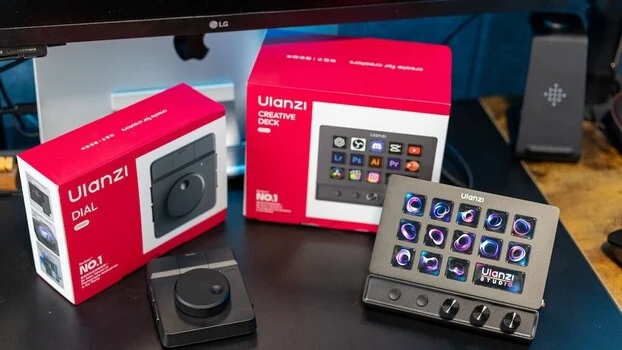
The landscape of digital content creation is perpetually evolving, with creators constantly seeking tools that promise to enhance efficiency and streamline demanding workflows. For photographers and videographers, the hours spent away from the camera—editing, managing files, communicating with clients, and planning future projects—can often rival or even surpass time spent in the field. This reality underscores the critical importance of a well-optimized desk setup that prioritizes efficiency, comfort, and seamless operation. Against this backdrop, Ulanzi has introduced two new control devices, the D200X Creative Deck and the Dial, aiming to redefine how creators interact with their software. This report delves into the real-world application of these tools, examining whether they deliver on their promise to reduce time at the desk or introduce an additional layer of complexity to an already intricate process.
The Ever-Present Challenge of Desk Time
For many creative professionals, the allure of capturing stunning visuals or engaging with clients is often tempered by the necessity of extensive post-production work. A photographer or videographer’s business acumen is as crucial as their technical skill, and a significant portion of this administrative and creative labor occurs at a desk. While established setups, including ergonomic workstations and familiar computer navigation, can foster efficiency, the desire to minimize time spent tethered to a screen remains a driving force. This pursuit of greater output and reduced desk time has fueled the emergence of studio-style control products, devices featuring dials, knobs, and programmable buttons designed to offer quicker access to software functions and reduce repetitive actions to single-press commands. This approach resonates particularly with professionals who, like the author, already leverage keyboard shortcuts extensively in their photo and video editing.
Ulanzi D200X Creative Deck: A Multifaceted Control Hub
The Ulanzi D200X Creative Deck builds upon the foundation laid by its predecessor, the Ulanzi D200, which was positioned as a more budget-friendly alternative to established devices like the Elgato Stream Deck, offering a comparable functionality with its 14 customizable keys. The D200X expands on this concept, presenting itself not merely as a shortcut device but as a potential centerpiece for a creator’s workspace, integrating cable management solutions and serving as a compact hub.
On paper, the D200X boasts a compelling array of features. While specific technical specifications were not detailed in the initial product announcement, the device is understood to incorporate customizable keys, programmable dials, and a central display. The promise of a more integrated and intuitive control system is central to its appeal.
Unpacking and Initial Impressions: A Seamless Introduction
The unboxing experience for the D200X is designed for immediate usability. The device is self-contained, and unlike its predecessor, the D200X features a fixed base, eliminating the need for angle adjustments. The package includes essential connectivity options: a USB-C to USB-C cable, along with an adapter for USB-A ports, ensuring compatibility with a wide range of systems. A physical manual is provided, offering a tangible guide, though the majority of the device’s functionality is elaborated within the accompanying software.
The Ulanzi Studio app, available for both macOS and Windows, is the gateway to the D200X’s capabilities. Installation is reported to be straightforward, and upon connection, the device is recognized by the software without delay. This immediate recognition is crucial for users eager to integrate new hardware into their workflow without significant setup friction.
Software and Customization: Tailoring the Experience
The true power of the D200X is unlocked through its software interface. Out of the box, users are greeted with pre-configured profiles designed for common tasks. These profiles leverage hotkeys, consolidating multiple input commands into single button presses. For instance, a complex multi-key combination typically required for taking a screenshot on macOS can be reduced to a solitary press on the D200X.
All 13 programmable buttons offer extensive customization, allowing users to create multiple profiles tailored to specific applications or workflows. The larger central display button provides further versatility, capable of showing the current time, system performance metrics (CPU, RAM, GPU utilization), or even custom images, adding a personalized touch to the workspace.
Real-World Application: Integrating into the Creative Workflow
The most critical aspect of any productivity tool is its integration into actual creative processes. The D200X demonstrates significant potential in this regard, particularly when paired with editing software like Adobe Lightroom and Photoshop. By downloading specific application profiles, users can assign frequently used tools and functions to the device’s buttons. For example, within Lightroom, users could assign functions such as adjusting exposure, white balance, or applying specific presets to dedicated buttons. This provides a more tactile and immediate approach to editing, a dimension that traditional mouse and keyboard interactions cannot fully replicate. For those looking to maximize their proficiency with Lightroom, resources such as "Mastering Adobe Lightroom: How to Use Lightroom" by Pye Jirsa offer foundational knowledge that can be synergistically enhanced by devices like the D200X.
Beyond direct editing, the D200X proves invaluable for website navigation and administrative tasks. Creators frequently move between their professional websites, client portals, and content platforms for tasks like writing blog posts, preparing newsletters, or sharing resources. Historically, this involves multiple clicks, tab management, and repeated URL entries. The D200X streamlines this by allowing dedicated buttons to be programmed for instant access to these frequently visited sites. A single press can launch a specific website, open a predefined email composition window, or initiate a cloud storage sync, effectively eliminating minor but cumulative time drains throughout the workday.
The device also serves as a practical hub for peripheral connectivity. The integrated SD and microSD card readers are particularly useful, offering quick and convenient access to media files without the need for external dongles or navigating through system menus. This physical integration contributes to a cleaner desk setup and a more fluid transfer of assets.
Design and Durability: A Blend of Form and Function
The D200X is constructed with a focus on durability and aesthetic appeal. Its solid build quality ensures it sits securely on a desk, contributing to an organized and visually appealing workspace. The customizable buttons, each acting as a small display, allow for the assignment of unique icons or images. This visual cueing system significantly aids in rapid identification of functions, especially during intensive editing sessions. The "cool factor" is undeniable, with the device often becoming an immediate point of interest. Anecdotal evidence suggests that the engaging and visually dynamic nature of the customizable buttons can spark curiosity, even among younger users, highlighting the device’s appeal beyond pure functionality. While the primary focus for professional use remains on workflow enhancement, the engaging design is a positive attribute.
Navigating Setup Nuances and Limitations
While the D200X generally offers a smooth setup experience, certain aspects warrant consideration. The fixed viewing angle of the device, unlike some of its predecessors or competitors, might not be optimal for all desk heights and user positions. Additionally, the text labels on the button displays can be challenging to read clearly at certain angles, a potential issue that could be addressed through future software or firmware updates by repositioning the text to the top of the display. The initial setup, while largely intuitive, can involve a slight learning curve as users familiarize themselves with the software and the process of assigning custom functions. None of these are insurmountable obstacles, but they do represent minor points that can slightly extend the initial setup time.
Ulanzi Dial: A Focused Approach to Control
Complementing the D200X, Ulanzi also offers the Dial, a more minimalist and focused control device. This unit features a single, prominent dial accompanied by programmable buttons. Like the D200X, the Dial supports multiple profiles and full customization but omits the visual icons of its counterpart. The buttons on the Dial also offer secondary functions, effectively doubling the available command options within a more compact footprint.
Video Editing: The Dial’s Sweet Spot
The Ulanzi Dial appears particularly well-suited for video editing workflows, especially within applications like Final Cut Pro. Its primary function as a tactile control for timeline navigation and playback is a significant advantage. Common use cases include scrubbing through footage, adjusting playback speed, and fine-tuning clip durations or transitions with precision. This hands-on control is reminiscent of professional studio setups and can lead to more efficient editing over time. For photographers transitioning into video production, understanding the fundamentals of filmmaking, as outlined in resources like "Introduction to Video: A Photographer’s Guide to Filmmaking," can be effectively paired with the tactile control offered by the Dial.
Value and Performance: An Accessible Entry Point
Priced at approximately $35, the Ulanzi Dial represents a highly accessible entry point into dedicated control devices, especially when compared to more feature-rich but significantly more expensive options like Loupedeck. Its core strengths lie in its affordability, ease of setup, and direct applicability to specific tasks. The device is robustly built for its price point and offers dependable performance for its intended use cases, making it a compelling option for video editors seeking enhanced timeline control without a substantial investment.
Comparative Verdicts: Distinct Solutions for Different Needs
Both the Ulanzi D200X and the Dial address the need for more efficient creative workflows, albeit through distinct approaches. The D200X is positioned as a comprehensive central control unit, integrating shortcut functionality, system monitoring, and hub-like connectivity. Its extensive customization options, including programmable buttons and dynamic profiles, offer the potential to replace a multitude of repetitive actions across editing, administrative, and general daily tasks. The ultimate benefit of the D200X hinges on the user’s commitment to integrating it into their workflow. The transition from established keyboard shortcuts to a hardware-based system requires an adaptation period, during which it might initially feel slower before realizing significant time savings. However, the inclusion of tactile dials for nuanced adjustments provides a distinct advantage that keyboards cannot replicate.
In contrast, the Dial offers a more focused solution. It deliberately avoids attempting to be an all-encompassing device, instead providing a simple, tactile control method that excels in specific areas, particularly video editing. Its straightforward setup and intuitive operation mean users can begin to see benefits almost immediately, without the same level of workflow restructuring required for the D200X.
In essence, the D200X functions as a broader workflow enhancement tool, while the Dial serves as a more targeted editing accessory.
Ulanzi D200X: Strengths and Weaknesses
Pros:
- Extensive customization for a wide range of applications.
- Integrated system monitoring and hub functionality.
- Tactile control with programmable dials.
- Visually engaging design with customizable button displays.
- Potential to significantly streamline repetitive tasks.
Cons:
- Requires a commitment to adapting existing workflows.
- Fixed viewing angle may not suit all users.
- On-screen text can be difficult to read at certain angles.
- Initial learning curve for full customization.
Ulanzi Dial: Strengths and Weaknesses
Pros:
- Highly affordable, offering exceptional value.
- Simple and intuitive for focused tasks, especially video editing.
- Quick and easy setup process.
- Tactile control for timeline navigation and adjustments.
- Compact and space-saving design.
Cons:
- Limited functionality compared to the D200X.
- Lacks visual display for button functions.
- Primarily suited for specific editing tasks.
Conclusion: Adapting to Evolve
For creators seeking to fundamentally restructure their interaction with editing software and reduce repetitive actions across their entire operational spectrum, the Ulanzi D200X presents a compelling proposition with its extensive flexibility and long-term value. The device’s potential to consolidate numerous commands and provide system insights makes it a powerful addition to a dynamic workspace.
Conversely, for individuals whose focus is more specific, particularly within the realm of video editing and timeline control, the Ulanzi Dial offers a simpler, more immediate, and cost-effective solution. Its direct approach to tactile control can yield tangible efficiency gains without demanding a significant overhaul of existing habits.
Ultimately, neither the D200X nor the Dial can substitute for the skill and experience of a creator. However, both have the capacity to eliminate minor inefficiencies, thereby freeing up valuable time and mental energy. The extent to which these devices translate into meaningful time savings is directly correlated to a user’s willingness to adapt their established workflows and embrace these new tools as integral components of their creative process. The journey from recognizing potential to realizing tangible benefits lies in the deliberate integration and consistent application of these innovative control surfaces.