Albert Omoss, a seasoned motion designer and the Creative Director at Meta Reality Labs, has officially released ArcBrush 1.5, marking a significant evolution for the node-based image editing software. This major update transitions the application from a specialized tool for concept artists into a robust contender for professional visual effects (VFX) and motion graphics pipelines. By introducing a 32-bit image processing engine, comprehensive color management, and a revamped licensing model, ArcBrush 1.5 aims to challenge the industry’s reliance on subscription-based layer editors like Adobe Photoshop and procedural heavyweights like Adobe Substance 3D Designer.
The Evolution of a Node-Based Alternative
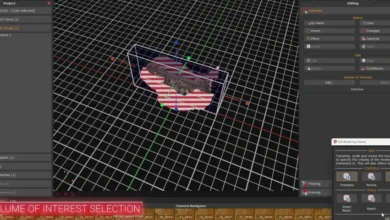
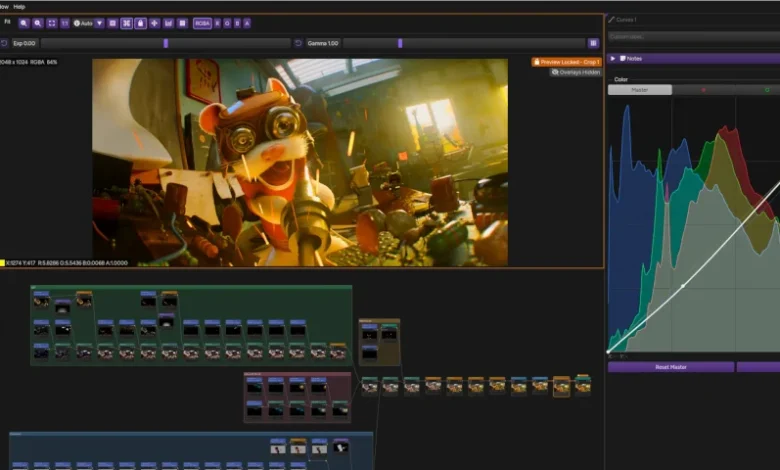
Since its initial debut earlier this year, ArcBrush has positioned itself as a "Photoshop alternative" for a new generation of digital artists. Unlike traditional image editors that rely on a linear layer stack, ArcBrush utilizes a node-based architecture. This approach, familiar to users of Foundry’s Nuke or Blackmagic Design’s Fusion, allows artists to create complex visual logic by connecting functional blocks in a graph. The primary advantage of this workflow is its inherently non-destructive nature; every adjustment, filter, and transformation remains live and editable at any point in the process, regardless of how many steps have been added later in the chain.
The software was originally designed to cater to game artists, illustrators, and graphic designers who required a more procedural way to handle textures and sprites. The initial version launched with a library of 75 nodes, covering essential tasks such as color keying, masking, and texture transformations. It also included specialized tools for the burgeoning pixel art market, such as sprite sheet packing and automated pixelation nodes. However, as the user base expanded, the demand for high-end cinematic features grew, leading directly to the architectural overhaul seen in version 1.5.
Technical Architecture and 32-Bit Processing
The most significant technical milestone in ArcBrush 1.5 is the introduction of a full 32-bit image processing pipeline. In digital imaging, the bit depth determines the amount of color information a file can hold. While standard 8-bit images (like JPEGs) are limited to 256 levels per color channel, a 32-bit float pipeline allows for a near-infinite range of values, preserving detail in the brightest highlights and deepest shadows.
This high dynamic range (HDR) capability is a prerequisite for professional VFX work, where images must be composited without losing data or introducing "banding" artifacts. ArcBrush 1.5 now supports end-to-end 32-bit workflows, allowing artists to import, process, and export images without clipping data. This transition is supported by a significant expansion in file format compatibility, most notably the inclusion of OpenEXR. The software now handles multi-part and tiled EXR files, which are the industry standard for transporting multi-layered render passes from 3D software into compositing environments.
To complement this new pipeline, Omoss has integrated industry-standard color management via OpenColorIO (OCIO). This allows users to work within specific color spaces such as ACEScg, ACEScct, and P3-D65, ensuring that the visual output remains consistent across different monitors and production stages. The software also includes advanced display transforms, such as the AgX and ACES views, which provide a more "filmic" look to digital imagery by handling highlight roll-off more naturally than traditional sRGB curves.
Advanced Features for VFX and Motion Graphics
ArcBrush 1.5 introduces a suite of nodes specifically designed for compositing workflows. Chief among these is support for Cryptomatte, an open-source technology that automatically generates ID masks from 3D renders. This allows 2D artists to isolate specific objects or materials in a rendered scene with a single click, drastically reducing the time spent on manual rotoscoping or "matting."
The update also adds a "Composite" category of nodes, which includes:
- Merge: A sophisticated node for combining layers using various blend modes.
- Premult/Unpremult: Essential for handling alpha channels and transparency in professional compositing.
- Despill: A tool for removing green or blue "spill" from footage or renders, a common requirement in chroma keying.
- Clamp: A utility to restrict pixel values within a specific range, preventing illegal color values in the final output.
- Apply LUT: Allows users to apply Look-Up Tables (LUTs) to their projects, facilitating rapid color grading and look development.
These additions bridge the gap between simple image editing and high-end compositing, making ArcBrush a viable tool for indie filmmakers and small VFX houses who need a lightweight, efficient environment for shot finishing and texture look-dev.
A Strategic Shift in Pricing and Licensing
Perhaps the most discussed change in ArcBrush 1.5 is the abandonment of its original "credit-based" monetization strategy. Previously, the core software was free to use, but users were charged per use for advanced features that utilized third-party artificial intelligence (AI) models, such as upscaling or background removal.
The new model moves toward a more traditional software ownership philosophy. While a free version remains available, it is now restricted to non-commercial use and limited to the older 8-bit workflow. For professional use, ArcBrush now offers an "Indie" perpetual license for a one-time fee of $49. This license is available to individuals and studios with an annual revenue of less than $250,000. For larger organizations, a "Studio" license is available on a rental basis for $99 per year.
This shift is seen by many in the community as a response to the growing fatigue surrounding subscription-based "Software as a Service" (SaaS) models and the ethical debates surrounding generative AI. By offering a perpetual license, Omoss provides a sense of security and ownership that is increasingly rare in the creative software market. Furthermore, the AI features have been scaled back; while cloud-based upscaling and background removal are still available, they are now included as part of the account service with monthly usage caps rather than being the primary revenue driver.
Performance and Pipeline Integration
Despite the addition of complex new features, ArcBrush remains a native desktop application built for performance. It leverages GPU acceleration through OpenGL and OpenCV, ensuring that even complex node graphs remain responsive on a wide range of hardware. Unlike web-based editors, the native architecture allows for better memory management and faster file I/O, which is critical when working with large 32-bit EXR sequences.
For artists who move between multiple pieces of software, ArcBrush maintains high levels of compatibility. It supports standard bitmap and vector formats, including PNG, JPEG, WebP, TGA, BMP, and SVG. Additionally, it can import palette files from other industry giants, supporting Adobe’s .ase and GIMP’s .gpl formats. This makes it an ideal "bridge" tool for artists who might start a project in a vector program, process it procedurally in ArcBrush, and then export it to a game engine or a 3D application.
Industry Implications and Market Analysis
The release of ArcBrush 1.5 comes at a time of transition in the digital art world. As Adobe continues to integrate generative AI into Photoshop and maintains its subscription-only model, a segment of the professional market has begun looking for "exit ramps"—tools that offer specialized power without the recurring costs or the overhead of unnecessary features.
ArcBrush occupies a unique niche. It is more flexible than a standard image editor but less daunting than a full-scale compositing package like Nuke. For the indie game developer or the solo motion designer, the $49 price point represents an accessible entry into high-end color science and procedural workflows.
The move to include Cryptomatte and OCIO is particularly telling. It signals that ArcBrush is no longer just a hobbyist tool but is positioning itself to be part of a professional pipeline. While it may not replace Photoshop for high-end photo retouching or Nuke for complex 3D compositing overnight, its existence puts pressure on larger developers to offer more flexible licensing and better procedural tools.
System Requirements and Availability
ArcBrush 1.5 is available now and supports a broad range of operating systems. It is compatible with Windows 10 and higher, Ubuntu 22.04+ (and other Linux distributions using glibc 2.35+), and macOS 12.0 or later.
The software’s tiered access ensures that it remains accessible to beginners while providing the necessary power for professionals:
- Free Version: Limited to personal, non-commercial use and 8-bit color depth.
- Pro License ($49): Perpetual license for commercial use (under $250k revenue), includes 32-bit mode and all advanced nodes.
- Studio License ($99/year): Rental-based for larger enterprises, providing the full feature set for high-revenue environments.
As the digital landscape continues to evolve, the success of ArcBrush 1.5 will likely depend on its ability to maintain its lean, performance-oriented focus while continuing to adopt the open standards that professional artists rely on. For now, it stands as a testament to the power of independent development in an era dominated by corporate giants.