
The rapid proliferation of immersive chat interfaces has fundamentally altered how users interact with the web. Unlike traditional static web pages, these applications create a dynamic, state-heavy environment where content updates in real-time, often without full-page reloads. For users who rely on screen readers or other assistive technologies, this shift presents significant barriers. Without deliberate, accessible architecture, the "immersive" nature of these platforms—characterized by streaming responses, complex sidebars, and rapid-fire prompts—can effectively exclude individuals with visual, motor, or cognitive disabilities from the opportunities provided by AI.
The Evolution of the Chat Interface
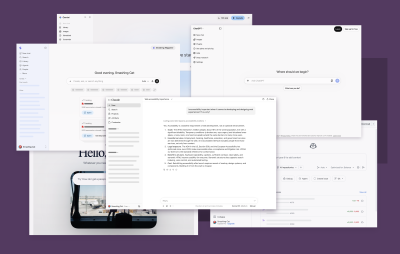
The current generation of LLM interfaces traces its lineage back to the rise of simplified chatbot widgets used for customer support. However, the modern "immersive" chat experience—defined by full-screen, persistent conversational contexts like GitHub Copilot or Claude—represents a more complex design paradigm. These platforms are frequently built using web-based technologies and deployed within native desktop wrappers, such as Electron or Tauri.
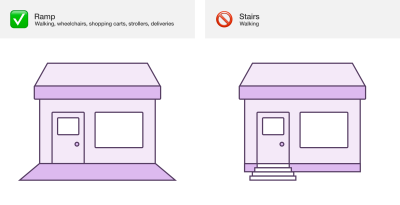
By late 2023, the integration of these tools into professional workflows—from software development to legal document analysis—made accessibility a matter of employment and economic opportunity. If a developer with a visual impairment cannot effectively navigate the chat interface of an AI-powered coding assistant, they face a tangible career barrier. Research into the social model of disability highlights that these barriers are not inherent to the user but are failures of the built digital environment. Just as a building requires a ramp for wheelchair access, a digital interface requires accessible navigation, keyboard support, and clear semantic structure to be truly functional for all.
The Technical Challenge: Visual Bias in Design
Software development is historically burdened by an overwhelming visual bias. Designers and developers often prioritize visual aesthetics—such as the alignment of speech bubbles or the speed of text-streaming animations—over the underlying semantic structure. This visual-first approach creates a "silent" experience for users who cannot see the screen. When an LLM generates a response, a sighted user immediately perceives the text. In contrast, a screen reader user remains unaware that new content has arrived unless the application explicitly signals the change via ARIA (Accessible Rich Internet Applications) live regions.
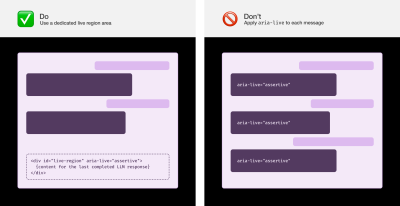
Effective implementation of live regions is a technical hurdle that requires precision. A common error involves applying live region attributes to every single message as it streams, which can cause screen readers to stutter or announce fragmented, nonsensical text. Instead, best practices suggest using a dedicated, stable container at the end of the document object model (DOM) that triggers an announcement only once the LLM has completed its response. This approach provides an "equivalent experience," ensuring that the information conveyed to a sighted user is accurately and reliably communicated to those using assistive technology.

Navigating Complexity: Headings, Landmarks, and Skip Links
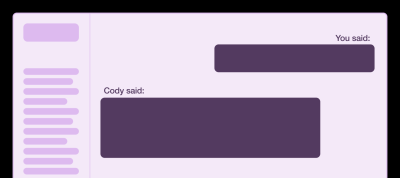
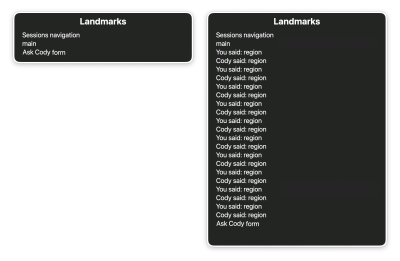
For screen reader users, navigation is heavily reliant on headings and landmark regions. In a long-running chat session that may contain hundreds of interactions, the absence of clear structural headers makes scanning the conversation nearly impossible. Inserting visually hidden headings before each prompt and response—such as "User said" or "Agent said"—allows users to navigate the conversation as efficiently as a sighted user who might scroll upward to review previous exchanges.

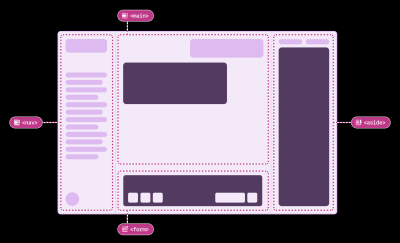
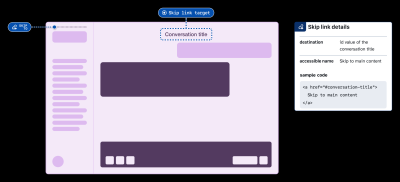
Landmarks serve a similar purpose for the overall layout. By defining regions like "navigation," "main," and "form," developers can help users understand the page architecture. However, caution is required; over-populating the page with too many landmarks can clutter the screen reader’s navigation menu, making it harder for users to locate the information they need. A balanced approach—using a "skip-to-main" link at the top of the document—allows users to bypass repetitive sidebar navigation and jump directly to the active conversation, a feature that should be standard in all enterprise-grade AI tools.

Supporting Diverse User Needs through Preferences
Accessibility is fundamentally tied to customization. No two users interact with technology the same way, and for users with cognitive or attention-based disabilities, the default settings of an AI chat interface can be overwhelming. Providing a robust preference menu is essential for maintaining a user-centric experience.

Key preferences that should be standard in AI interfaces include:

- Granular Announcement Control: Users should be able to toggle the announcement of secondary actions, such as "searching," "reasoning," or "tool calling." While these are vital for transparency, they can be distracting when announced in rapid succession.
- Reduced Motion Settings: Many LLMs use streaming animations to signify activity. Respecting system-level "prefers-reduced-motion" settings or providing a toggle to disable these animations can help users who find motion disruptive to their focus.
- Sound Customization: As AI tools integrate auditory cues to signal the start or completion of a task, users must have the ability to disable these sounds independently of their system volume, particularly those who use white noise or music to maintain concentration.
- Re-bindable Keyboard Shortcuts: For users with motor impairments, custom keyboard commands are not just a convenience—they are a necessity for productivity. Allowing users to remap shortcuts ensures they can adapt the interface to their specific ergonomic needs.
Implications for Future Development
The shift toward AI-integrated interfaces is one of the most significant technological transitions of the decade. According to industry projections, the global market for generative AI is expected to grow at a compound annual rate of over 30% through 2030. As these tools become embedded in government websites, educational platforms, and corporate intranets, the legal and ethical implications of inaccessible design will grow.
Under frameworks like the Americans with Disabilities Act (ADA) in the United States and the European Accessibility Act (EAA), digital accessibility is increasingly being viewed through the lens of civil rights. Organizations that fail to prioritize these considerations risk not only alienating a significant portion of their user base but also facing potential legal challenges.
The Path Forward: Inclusive User Research
The most effective way to ensure accessibility is to involve disabled people throughout the development cycle. Inclusive user research is not a checkbox; it is a fundamental shift in perspective. By treating disabled users as the primary experts on their own experiences, development teams can move beyond mere compliance toward true equity.
Techniques such as F6 navigation—a legacy desktop navigation method—can be re-implemented in web-based AI chat apps to provide a familiar and efficient way for users to hop between the prompt input and the AI response. However, such features must be socialized and clearly documented in the application’s settings.
In conclusion, the goal of making LLM chat experiences accessible is to ensure that the rapid advancement of artificial intelligence does not leave anyone behind. By adopting semantic HTML, properly managing ARIA live regions, providing flexible user preferences, and committing to ongoing inclusive research, the tech industry can ensure that the next generation of digital tools is truly built for everyone. As these platforms continue to evolve, the standard for "innovation" must include the mandate for universal access. Only then will the full potential of AI be realized for the benefit of all humanity.