Kiosk Library 2.1 Streamlines 3D Asset Management and Production Workflow for Digital Artists

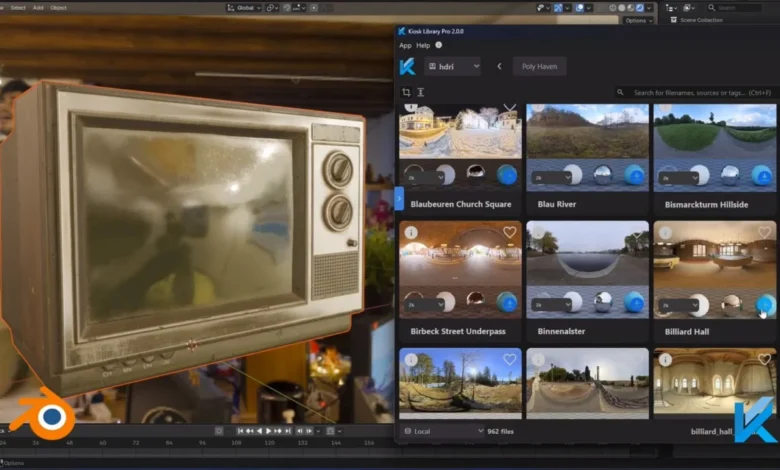
The modern digital production landscape is characterized by an exponential increase in the volume of assets generated during the lifecycle of a 3D project. As studios and independent creators grapple with increasingly complex scenes, the management of disparate file structures, texture maps, and model variants has become a significant bottleneck. Fabian Strub’s Kiosk Library software has emerged as a solution to this fragmentation, providing a centralized, visual asset management system designed to convert disorganized folder structures into efficient, searchable databases. With the recent release of version 2.1, the software introduces a direct Digital Content Creation (DCC) asset exporter, marking a significant step toward seamless integration in high-end production environments.
The Evolution of Digital Asset Management
Digital Asset Management (DAM) is not a new concept, but for 3D artists, the requirements are uniquely demanding. Unlike standard document management, 3D assets require the synchronization of geometry files, high-resolution textures, material definitions, and often complex node trees. Historically, artists have relied on manual folder hierarchies—a method prone to human error, broken file paths, and significant time loss during the search process.
Kiosk Library was conceptualized to address the specific "search-and-deploy" friction point that slows down 3D pipelines. By indexing existing file systems rather than forcing artists to migrate their data into a proprietary database, Kiosk Library respects the underlying folder structure while overlaying a sophisticated interface for visualization and retrieval. This approach minimizes the technical overhead often associated with adopting new management software, allowing users to integrate the tool into existing workflows without disrupting ongoing projects.
Analyzing the Version 2.1 Update
The release of Kiosk Library 2.1 serves as a milestone in the software’s maturation. The most notable addition is the direct DCC asset exporter. Previously, importing assets into a library often required manual organization, thumbnail generation, and path checking. The new exporter automates these processes, allowing users to push models directly from their DCC software—such as Blender, 3ds Max, or Maya—into the Kiosk library.
Key technical improvements in this release include:
- Automated Thumbnail Generation: The software now programmatically captures visual representations of assets upon export, ensuring consistency and immediate visual recognition.
- Resolved Texture Pathing: One of the most common issues in 3D production is the "missing texture" error caused by absolute vs. relative pathing. Kiosk Library 2.1 automatically handles path resolution, ensuring that when an asset is pulled from the library into a new scene, all dependencies are correctly linked.
- Enhanced DCC Integration: By reducing the time spent navigating menus to save, export, and rename assets, the software enables artists to maintain a state of "flow," significantly reducing the cognitive load associated with housekeeping.
Industry Context and Workflow Implications
In professional production, time is the most valuable commodity. Data from various industry surveys suggest that artists spend, on average, 15% to 20% of their working hours searching for, re-linking, or re-organizing assets. For a studio with a team of twenty artists, this equates to thousands of lost hours annually.
The shift toward specialized asset management software like Kiosk Library is reflective of a broader trend in the 3D industry. As real-time rendering engines like Unreal Engine and Unity gain dominance, the need for high-quality, pre-validated assets has increased. Tools that facilitate the rapid deployment of these assets are no longer just "nice-to-have" add-ons but essential infrastructure. Kiosk Library’s ability to categorize and filter assets allows artists to create "kits"—collections of frequently used items such as foliage, building parts, or furniture—that can be reused across multiple projects, thereby increasing the return on investment for every hour spent modeling.
Pricing and Accessibility Tiers
Fabian Strub has maintained a tiered pricing model that acknowledges the diverse needs of the creative community. By offering a free version, the software lowers the barrier to entry for students and hobbyists, fostering a user base that can grow with the tool.
- Free Version: Designed for individual creators, this tier includes the core functionality required for basic asset management and visual searching.
- Pro Version ($56.20): Targeted at freelancers and professionals, the Pro tier unlocks extended functionality, likely including advanced search metadata, deeper integration options, and priority support.
- Studio Version ($147.95): This tier is explicitly designed for small-to-medium teams. By providing three seats, it addresses the collaborative nature of production, allowing teams to share a centralized library structure, which is critical for maintaining consistency in large-scale projects.
Strategic Advantages of Localized Asset Management
One of the distinct architectural choices made in the development of Kiosk Library is its reliance on the local machine or local network rather than a cloud-only approach. While cloud-based asset management is becoming common, it is often limited by internet latency and bandwidth constraints, especially when dealing with massive 4K or 8K texture sets and high-poly geometry.
By remaining "folder-based," Kiosk Library allows studios to maintain their existing server-side security protocols. Artists can work on their local high-speed drives, and the library reflects those changes in real-time. This is particularly advantageous for studios handling proprietary data where security and file ownership are paramount. The "visual" aspect of the library—its ability to render thumbnails of complex geometry—is optimized to prevent the software from becoming a performance drain on the host machine, a common pitfall in older asset management plugins.
Future Outlook for Asset Management Tools
As the digital creation industry moves toward more collaborative and remote-first workflows, the demand for software like Kiosk Library is expected to grow. The integration of artificial intelligence in asset tagging and automated categorization is likely the next frontier for such tools. While Kiosk Library 2.1 focuses on structural efficiency, future iterations could potentially leverage machine learning to suggest asset tags based on visual recognition of objects, further automating the tedious manual entry processes that currently persist in the industry.
Moreover, the push for standardized file formats, such as USD (Universal Scene Description), aligns well with the philosophy behind Kiosk Library. As the industry moves toward a more unified ecosystem where assets are expected to move fluidly between different engines and DCCs, the role of a "source of truth" manager becomes indispensable. Kiosk Library positions itself as that source, acting as the connective tissue between the creative act of modeling and the technical requirement of file management.
Technical Support and Community Engagement
The developer has placed significant emphasis on documentation and community feedback. With the release of version 2.1, Strub has provided video walkthroughs and a structured digital presence through Gumroad, which serves as a hub for updates, troubleshooting, and user interaction. This direct line of communication between the developer and the user base is critical for specialized software. In an environment where a single bug can halt a production pipeline, the ability to rapidly iterate and provide support is a key differentiator for the software’s long-term viability.
Prospective users and studios interested in evaluating Kiosk Library can access the official website and the Gumroad storefront. The availability of comprehensive video demonstrations serves to lower the learning curve, allowing artists to visualize the integration process before committing to a license.
Conclusion
Kiosk Library 2.1 represents a refined, pragmatic approach to one of the most persistent problems in 3D production: the chaotic file management of project assets. By focusing on the intersection of intuitive visual organization and technical backend reliability, the tool offers a clear path toward increased productivity. For individual artists and small studios alike, the transition from manual, folder-based searching to an indexed, searchable library is a necessary evolution. As production demands continue to scale, the implementation of robust asset management systems will remain a defining factor in the success of digital creators and the studios that employ them.